

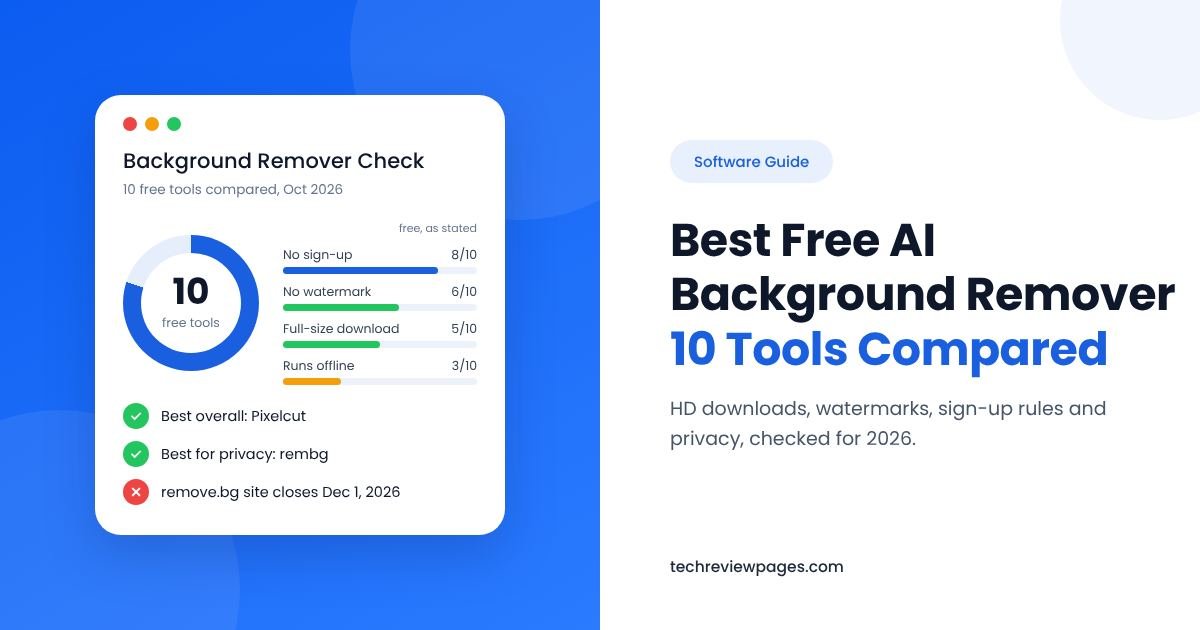
Search for a free background remover, and nearly every site makes the same promise: one click, a perfect cutout, totally free. Then you upload your photo and find the download is tiny, a logo is stamped across it or the site suddenly asks for your card.
The truth is that “free” means something different on every site. So the Tech Review Pages team compared 10 free AI background remover tools by what you really get without paying. We looked at download size, watermarks, sign-up rules plus privacy.
You will also learn about free background removal software that is already built into your phone or computer. Plus, we explain a big change coming soon, because the popular remove.bg website closes on December 1, 2026.
Quick Answer: The Best Free AI Background Removers
Best overall: Pixelcut. Free HD downloads, no sign-up, no watermark.
Best for huge photos: fal.ai’s free tool. Free 4K PNG downloads.
Best for pets and busy photos: Remover AI. No sign-up, no watermark.
Best for designers: Adobe Firefly. Free with an Adobe ID.
Best built-in tool: Windows Paint, or the lift subject feature on iPhone and Mac.
Best for privacy: rembg, a free open-source tool that runs offline.
How We Compared These Tools
We want to be honest about our method, so here it is. This guide is based on careful research rather than a hands-on lab test. On October 29, 2026, we checked each tool’s own website plus its help pages, then asked five simple questions about each one:
- Size: Is the free download full size, or just a small preview?
- Watermark: Does the tool stamp a logo on your image?
- Sign-up: Can you use it without making an account?
- Limits: Are there caps on file size, uses or batches?
- Privacy: Is your photo sent to a server, or kept on your device?
When a tool’s page did not answer a question, we say so instead of guessing. Free plans also change often, so a tool’s own pricing page is always the final word.
Free AI Background Removers Compared
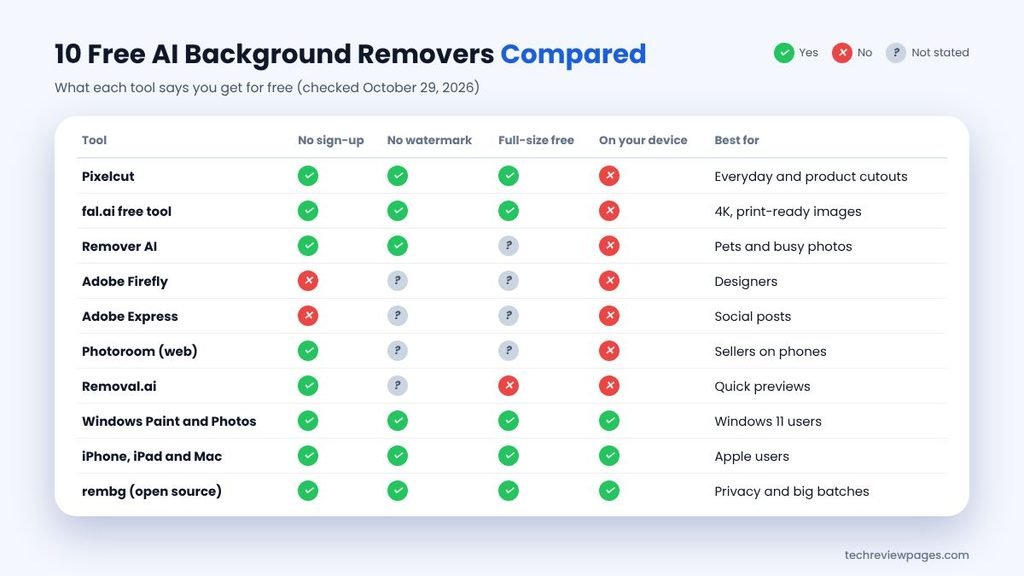
Here are all 10 tools side by side. Each row was checked on October 29, 2026.
| Tool | Sign-Up? | What You Get Free | Watermark? | Best For |
|---|---|---|---|---|
| 1. Pixelcut | No | HD download; uploads up to 50MB | No | Product photos and everyday cutouts |
| 2. fal.ai free tool | No | Full 4K PNG | No | Large, print-ready images |
| 3. Remover AI | No | Cutouts in your browser | No | Pets, products and busy photos |
| 4. Adobe Firefly | Yes, free Adobe ID | Transparent PNG; uploads up to 50MB | Not stated | Designers who use Adobe apps |
| 5. Adobe Express | Yes, free account | Transparent PNG inside a design | Not stated | Social posts and simple designs |
| 6. Photoroom | No, on the web | Free web cutouts | Not stated | Sellers who work on phones |
| 7. Removal.ai | No | Free preview; full size costs money | Not stated | Quick previews |
| 8. Windows Paint and Photos | No | Full size, saved on your PC | No | Windows 11 users |
| 9. iPhone, iPad and Mac | No | Full size, on your device | No | Fast cutouts for Apple users |
| 10. rembg (open source) | No | Full size, on your computer | No | Privacy and big batches |
Why is Canva not on the list? Canva’s marketing page promises free background removal. Yet Canva’s help center says the Background Remover is “included with paid plans,” with no stated free allowance. Our Canva background removal guide explains the details plus some honest workarounds.
The 10 Best Free AI Background Removers, Reviewed
1. Pixelcut: Best Overall Free Background Remover
Pixelcut’s background remover page offers a free HD download with no sign-up and no watermark. You can upload photos up to 50MB or 6000 x 6000 pixels, which covers almost any picture from a phone.
Pixelcut is built with online sellers in mind, so it is a strong pick for product photo editing. It also has a bulk tool for batch background removal, although its page does not say whether free users can use it.
Good for: product photos, profile pictures, quick social posts. Watch out for: batch limits that are not spelled out.
2. fal.ai Free Tool: Best for 4K Images
fal.ai is mainly a platform for app developers, but anyone can use its free background remover. The page says you get full 4K PNG downloads with no watermark, no sign-up plus no card needed.
That makes it great for large prints or detailed product shots. For developers, fal.ai also lists several AI models, such as BiRefNet for hair and portraits. However, its free page does not explain how long uploaded images are kept, so avoid it for private photos.
3. Remover AI: Best for Pets and Busy Photos
Remover AI is a free tool that runs right in your web browser. According to its own site, it needs no sign-up, adds no watermark plus accepts JPG, PNG or WEBP files.
Its site says it can handle tricky images with several subjects, pets or small accessories while keeping fine details like hair. Its page does not list the free download size, so check the result before you rely on it.
4. Adobe Firefly: Best for Designers
Adobe Firefly’s background remover is free, but you need a free Adobe ID to use it. Adobe’s listing says it accepts JPG, PNG or WEBP files up to 50MB. One of its smaller pages lists 40MB, so stay under 40MB to be safe.
The tool uses AI edge detection made for hair and fur, which makes it a great portrait cutout tool. If you already use Photoshop or Lightroom, it fits right into your work, and the only real catch is the account step.
5. Adobe Express: Best for Social Posts
Adobe Express includes free background removal inside its online photo editor. After you remove the background, you can drop your subject onto a template, add text, then export it for Instagram, TikTok or YouTube.
It is a handy free choice if you want a finished design, not just a cutout. Saving your project requires a free Adobe login.
6. Photoroom: Best for Sellers on Phones
Photoroom’s web tool says it is fast, free plus needs no sign-up. Its phone app is popular with resellers who shoot and list items from their phones. Paid plans add batch editing with extra tools, so check the export screen for limits before you finish a big job.
7. Removal.ai: Best for Quick Previews
Removal.ai lets you remove a background with no sign-up. Its pricing page focuses on paying for full-resolution images, which suggests free users get a smaller preview. It also offers a simple background eraser for touch-ups plus ready-made backgrounds.
8. Windows Paint and Photos: Best Free Option on Windows 11
If you use Windows 11, you may already have a free background remover. Here is how to use it in Paint:
- Open Paint, then go to File, then Open, and pick your image.
- In the Image section of the toolbar, click Remove background.
- Zoom in and use the Eraser to clean up any leftover bits.
- Save your file as a PNG to keep the clear background.
The Photos app works too. Open the image, click Edit image, then Background, then Remove, and Photos will save the result as a PNG. Best of all, your photo never leaves your PC.
9. iPhone, iPad and Mac: Best Built-In Option for Apple Users
Apple added a free background remover to its devices in 2022, starting with iOS 16 and macOS Ventura. The work happens on your device, so your photo stays private.
- iPhone or iPad: open a photo, then touch and hold the main subject. Tap Copy or Share to lift out a clean photo cutout.
- Mac: right-click an image in Finder. Choose Quick Actions, then Remove Background. Your Mac saves a new PNG next to the original.
Many Android phones have a similar feature. On Samsung Galaxy phones, for example, you can long-press a subject in the Gallery app to cut it out.
10. rembg: Best Free Offline Tool for Privacy
rembg is a free, open-source program that runs on your own computer, so nothing is uploaded. It uses well-known AI models such as U2-Net, plus newer ones like BiRefNet. Its code uses the MIT license, which allows personal or business use.
You need Python installed. Then follow these steps:
- Open your computer’s terminal or command prompt.
- Install the tool by typing:
pip install "rembg[cpu,cli]" - Remove one background by typing:
rembg i photo.jpg cutout.png - Process a whole folder by typing:
rembg p input-folder output-folder
The first run downloads an AI model, so it takes a little longer. After that, you get unlimited cutouts with total privacy, which makes it a powerful free cutout tool.
One important license note: rembg’s code is MIT licensed, but each AI model has its own license. Its default model, BRIA RMBG, needs a paid agreement for business use, according to the rembg project page. For business work, switch to another model with the -m option, such as birefnet-general, and check that model’s license first.
Safety tip: only download open-source tools from their official project page. Avoid copies on random download sites.
Other Free Background Removers Worth a Look
Clipdrop, Erase.bg, Slazzer, VanceAI, Pixlr plus Fotor also offer free cutouts. Most follow the same pattern, giving you a few free images or a smaller download before asking you to pay for full quality. Test them with the five checks below before you commit.
Designers who work in Figma should know one thing before they start. Figma’s background remover is part of its AI agent, which Figma’s own page says is available on paid plans. Free Figma users will need one of the tools above.
What “Free” Really Means: 5 Catches to Watch For
Before you trust any free tool, run through this quick checklist.
| The Catch | What It Looks Like | How to Avoid It |
|---|---|---|
| Small preview | Sharp on screen, blurry when printed | Check the pixel size. Pick a tool with free HD |
| Watermark | A logo stamped on your image | Choose a tool that says “no watermark” |
| Sign-up wall | You must make an account to download | Use a no-sign-up tool for one-off jobs |
| Credit limits | A few free images, then you must pay | Use built-in or offline tools for big batches |
| Server uploads | Your photo is stored on another company’s server | Use on-device tools for private photos |
Need at least 1080p? Choose a tool that offers free HD or full-size downloads, like Pixelcut, fal.ai or the built-in tools. Free previews from other sites can be much smaller than 1080p.

How Does an AI Background Remover Work?
Every automatic background remover follows the same basic steps, whether it is a big brand or a small free site. This kind of AI image background removal takes only seconds, and here is a simple look at what happens.
- The AI looks at your photo. It has learned from millions of example images, so it can spot people, pets and products.
- It finds the subject. Using object detection, the AI spots the main subject, then sorts every pixel into “subject” or “background.” This is called image segmentation, or foreground extraction, and it ends with mask generation, which draws the subject’s exact shape.
- It softens the edges. For hair and fur, better tools add a step called matting. Edge pixels become partly see-through, so fine strands look natural.
- It saves a transparent PNG. The clear areas are stored in the file’s alpha channel, so the background stays see-through.
Older models like U2-Net and MODNet made this possible for free tools. Classic color tools work in a different way, because they simply remove every pixel close to one color you pick. Our guide on how to remove color from an image explains those methods.

How Accurate Are Free AI Background Removers?
On a clear photo with one main subject, today’s AI tools do a great job. However, they still struggle in a few common cases:
- Fine hair or fur against a busy background
- Glass, smoke or see-through fabric
- A subject that matches the background, like a white shirt on a white wall
- Photos with several people or objects
- Dark or blurry photos
Tips for Cleaner Free Cutouts
Shoot on a plain background with bright, even light.
Upload the biggest file you have. More detail helps the AI.
Zoom in to check the edges before you download.
Try two tools on tricky photos. Each AI model gives slightly different results.
Check your PNG on a dark background to spot leftover white edges.
Best Free Background Remover for Each Job
| If You Need… | Try This | Why |
|---|---|---|
| Product photos for eBay, Etsy or Amazon | Pixelcut or Photoroom | Clean product edges, easy white backgrounds |
| A portrait with fine hair | Adobe Firefly or fal.ai | Edge detection made for hair |
| A pet photo | Remover AI | Its site says it handles fur and pets |
| A logo with a white background | Windows Paint or a color tool | Flat colors are easy to remove |
| HD or 4K quality | fal.ai or Pixelcut | Full-size free downloads |
| No account at all | Pixelcut, fal.ai, Remover AI or built-in tools | No sign-up needed |
| Total privacy | Apple tools, Windows Paint or rembg | Your photo stays on your device |
| Hundreds of images | rembg | No limits on free use |
Selling online? Our ecommerce photo editing guide covers the white background rules for each marketplace.
Free AI Background Changers: Swap Instead of Remove
Sometimes you want a new background instead of an empty one. An AI background changer removes the old background first, then adds a new color, photo or AI-made scene.
Pixelcut, Photoroom and Adobe Express all offer background swaps. The Windows Photos app can replace a background with a solid color. For a plain white background, just place your transparent PNG on a white layer in any editor, which turns almost any app into a simple transparent background maker.
Are Free Background Removers Safe to Use?
Most online tools, including any online photo editor with AI photo editing features, upload your photo to their servers. That is usually fine for a product shot, but you should be more careful with family photos, ID cards or client work.
- Read the privacy policy. Look for how long photos are kept and if they train AI.
- Use on-device tools for private photos. Apple’s tools, Windows Paint and rembg keep files on your device.
- Skip sign-ups you do not need. An account often means your photos are saved in the cloud.
- Never upload ID documents to free tools you do not know.
Thinking of using AI on a passport photo? Be careful. In the US, passport photos need a plain white or off-white background, and editing rules are strict. Check the US State Department’s photo rules, or your own country’s rules, before you edit one.
Can You Remove a Background Without AI?
Some people want a cutout with no AI at all, either for full control or because they worry about AI labels on social media. The classic way is manual: you draw around your subject with a pen tool, then delete the rest.
Two free editors handle this well: Photopea works inside any browser, while GIMP installs on your computer. It takes longer, but nothing is guessed by AI. Our free photo editing software guide lists more manual editors.
Which AI Can Remove Video Backgrounds for Free?
Removing a video background is harder, because the AI has to track your subject in every single frame. As a result, free options are more limited than for photos:
- CapCut: its own help pages describe free video background removal. Some effects may need a Pro plan.
- Canva: removes video backgrounds, but only on paid plans.
- Green screen: if you film in front of a green backdrop, most free video editors can remove it with a chroma key tool.
For more editing tools, see our guide to the best video editing app.
Case Study: remove.bg Closes Its Website on December 1, 2026
remove.bg was one of the first famous AI background removers. Canva bought its maker, the Austrian company Kaleido, in February 2021, and now Canva is moving the tool into its own apps.
News coverage quotes remove.bg’s own FAQ, which says the standalone website will no longer be available from December 1, 2026, at 9:00 AM CET. Here is what changes for each group of users:
| Who You Are | What Happens |
|---|---|
| Everyday users | remove.bg points people to Canva for single images and batches |
| Self-service API users | Access stops on December 1. Users are pointed to Leonardo.Ai, another Canva company |
| Enterprise API customers | Existing contracts are not affected |
| People with pay-as-you-go credits | Unused credits expire on December 1, 2026 |
| Plugin and integration users | Plugins stop working on the same date |
There is one big catch for free users. Canva’s help center lists its Background Remover as a paid feature, so people who relied on remove.bg’s free preview will need a new free tool. We will update this section after the change takes effect.
Lessons From the remove.bg Closure
- Free tools can vanish. Even famous ones get bought, merged or closed.
- Spend credits early. When a service announces changes, use your credits before the deadline.
- Keep a backup tool. Built-in tools like Windows Paint or Apple’s lift subject never depend on a website.
- Do not build a business on one free tool. Sellers with big catalogs should test a second option now.
Conclusion: Pick the Tool That Fits Your Needs
The best free AI background remover is the one that gives you what you need with no hidden catch. For most people, that is Pixelcut. It offers free HD downloads with no watermark and no sign-up. Pick fal.ai for big 4K files, Remover AI for pets and busy photos, or Adobe Firefly if you already have an Adobe ID.
Before you search the web, check your own device. Windows Paint, the Windows Photos app and Apple’s lift subject feature remove backgrounds for free. Nothing gets uploaded. For total privacy or big batches, rembg runs offline on your computer.
Finally, remember that free tools change. remove.bg’s website closes on December 1, 2026, and Canva’s remover is a paid feature. Keep a backup tool, check the download size every time and run the five checks before you upload. Then enjoy clean cutouts without spending a cent.
Frequently Asked Questions
What is the best free AI background remover?
For most people, Pixelcut is the best pick. It offers free HD downloads with no sign-up or watermark. fal.ai is best for 4K images, while rembg is best for privacy.
Is there a free AI background remover with no sign-up?
Yes. Pixelcut, fal.ai, Remover AI and Photoroom’s web tool need no account. Built-in tools on Windows, iPhone and Mac need no sign-up either.
Which free background remover has no watermark?
Pixelcut, fal.ai and Remover AI say they add no watermark. Windows Paint, Apple’s built-in tools and rembg never add one.
Where can I remove a background online for free in HD?
Pixelcut offers free HD downloads, and fal.ai offers free 4K PNGs. Some other sites only give a small free preview.
Can I use the Figma AI background remover free?
Not on the free plan. Figma’s page says its AI agent, which includes background removal, is available on paid plans.
What AI can remove backgrounds from videos for free?
CapCut describes free video background removal on its help pages. If you film on a green screen, most free video editors can remove the green for you.
Is Canva’s background remover free?
Not on the standard free plan. Canva’s help center lists it as a paid feature. Verified K-12 teachers or students (Canva Education) plus approved charities (Canva Nonprofits) get it at no cost.
Is remove.bg shutting down?
Its standalone website closes on December 1, 2026, at 9:00 AM CET. Users are pointed to Canva for images and to Leonardo.Ai for API use.
Can I use an AI image background remover free for business photos?
Often, yes, but check each tool’s terms first. Some open AI models, like BRIA RMBG, need a paid license for business use. Ecommerce image editing for a real store is business use.
Does AI background removal lower image quality?
Not if you download the full-size file. Quality problems come from tools that only give a small free preview.
