


Turning plain text into a PDF should only take a few seconds. You paste your notes, a resume or a letter, then download a clean file that looks identical on every phone, computer and printer. Most of the time, the process really is that simple.
But some text files come out wrong. Accents turn into strange symbols, Arabic or Chinese letters vanish, while headings look like ordinary lines. At Tech Review Pages, we converted the same test file four different ways to see where things break, so you can avoid those problems.
You can also convert text to PDF online free right here, because our converter runs entirely in your browser without uploading your text to a server.
Quick Answer: How Do I Convert Text to PDF Online Free?
Fastest way: paste your text into the free converter below, pick a page size, then click Download PDF.
Have a .txt file? Click “Open .txt file” or drag it onto the text box.
Writing in Arabic, Hindi, Chinese or with emoji? Click “Any language: Print to PDF,” then choose Save as PDF.
On your phone? Open this page in your mobile browser and paste your text, or use your phone’s Print menu and choose Save as PDF.
No internet? Use Notepad’s Print to PDF on Windows or TextEdit’s Export as PDF on a Mac.
Free Online Text to PDF Converter
Our free online text to PDF converter works on any computer, tablet or phone. Type, paste or open a text file, choose your layout, then download a PDF in about a second.
- Private: the PDF is built right on your device, which means your words never travel to a server.
- Copy and paste or upload: paste copied text, type it fresh, or open several .txt files at once.
- Simple formatting: start a line with # for a bold heading, or with – for a bullet point.
- Layout options: choose Letter, A4 or Legal paper in portrait or landscape, plus three fonts, line spacing, margins and page numbers.
- Any language: a second button uses your browser’s Print to PDF, which supports every script, including right-to-left text plus emoji.
- Free forever: you will not hit a sign-up wall, a watermark or a daily cap.
Which Button Should You Use?
| Button | Best For | Limits |
|---|---|---|
| Download PDF | English and Western European text; the smallest files | Built-in fonts only, so other scripts and emoji become “?” |
| Any language: Print to PDF | Arabic, Hebrew, Hindi, Chinese, Japanese, emoji | Opens your print window, where you pick Save as PDF |
Want to check that your text stays private? Press F12 in Chrome or Edge, open the Network tab, then click Download PDF. The only traffic is the tool fetching its own code a single time. Your text never appears in that list.
Tool Limits
- Text size: there is no set limit. In our test, a 100,000-word text became a 247-page PDF in about 1.2 seconds.
- Several files: open more than one .txt file at once, and the tool joins them into one PDF in the order you picked them.
- Older text files: files are read as UTF-8. If a file was saved in an older Windows format, the tool switches to Western (Windows-1252) text and warns you to check the accents.
- Fonts: Download PDF covers English and Western European letters. For other scripts, use Print to PDF, which relies on the fonts installed on your device.
How to Convert Text to PDF on Mobile
This converter works the same way on a phone. Open this page in Safari, Chrome or any mobile browser, paste your copied text, then tap Download PDF. The file lands in your Downloads or Files app. Prefer a built-in option? Our device guide further down shows the Print to PDF steps for iPhone and Android.
How to Convert Text to PDF Online Free (Step by Step)
Here is exactly how to convert text to PDF online free with our tool. The same steps work for a plain text note, a long report or a text document copied from email.
- Add your text. Paste it into the box, type it directly, or click “Open .txt file” to load a file from your computer or phone.
- Add a title if you want one. It prints at the top of the first page in bold.
- Choose your layout. Pick the page size, orientation, font, font size, line spacing and margins.
- Mark headings and bullets. Start a line with # for a heading or with – for a bullet. Leave the box ticked to turn them into real formatting.
- Click Download PDF. Your file saves in about a second. For other languages, click “Any language: Print to PDF,” then choose Save as PDF.
- Open the PDF to check it. Look at the first page before you share it.
What to Look for in a Free Converter
Before you trust any online text to PDF converter free of charge with your words, check these points:
- Privacy: does it work in your browser, or does it upload your text to a server?
- Languages: can it handle accents, other scripts and emoji without question marks?
- Formatting: can you set the page size, margins and font, or add simple headings?
- Searchable output: can you still select and copy the words in the finished PDF?
- No catches: watch for watermarks, daily limits or forced sign-ups.
Why Convert Text to a PDF at All?
A text file is perfect for writing, but it is a poor choice for sharing. Every app displays it differently, and some phones open it in a tiny, unformatted window. A PDF solves these problems in several ways:
- Consistent appearance: fonts, margins and page breaks stay exactly where you placed them.
- Professional impression: employers, schools and clients usually expect resumes, assignments or invoices as PDFs.
- Easy printing: a PDF prints the same way on any printer, without surprise line breaks.
- Universal compatibility: every computer, tablet and smartphone can open a PDF without extra software.
What Does Converting Text to PDF Do?
A plain text file, usually saved as .txt, holds only letters plus line breaks. Because it has no fonts, page size or margins, it can look different in every app. Converting plain text to PDF locks in a layout. The words stay the same, but every reader now sees identical pages, fonts and spacing.
A good text to PDF converter also keeps your words searchable, which means anyone can select, copy or search the text inside the PDF later. All four methods in our test managed this correctly.
We Converted the Same Text File 4 Ways: Here Is What Happened
To find out where text to PDF conversion goes wrong, we built one tricky test file on October 29, 2026. It had 988 words with headings plus bullet points. It also included accented words like café, single lines in Arabic, Hindi and Chinese, two emoji, as well as a very long web link with no spaces. The file was saved in UTF-8, the most common text format today.
We then turned it into a PDF with four methods, all on Letter paper with one-inch margins:
- Our Download PDF button: Helvetica 12 point, 1.15 spacing, page numbers on.
- Our Print to PDF button: the same settings, saved through the Chromium print engine.
- Chrome: the .txt file opened directly in Chromium 141, then printed to PDF.
- LibreOffice 24.2: its command-line converter with default settings.
We ran everything on a cloud Linux machine with common free fonts installed, including fonts for Chinese and emoji. Print-based PDFs use whatever fonts your own device has, so your results may differ. This is one file and four methods, so treat it as a clear demonstration rather than a full benchmark.

What We Learned
- Plain English text was never the problem: all four methods kept every English word, while none let the long link run off the page.
- Fonts decide which languages work. Our quick Download PDF button uses standard built-in fonts, so Arabic, Hindi and Chinese became question marks. The browser print methods pulled in extra fonts automatically, which let them show every script correctly.
- The wrong encoding garbles everything: LibreOffice’s converter guessed the wrong encoding, so “café” became “café.” Even the Chinese line turned into odd symbols. When we reran it with the encoding set to UTF-8, every line came out correctly.
- Only our tool turned # lines into real headings, while the other methods printed the # marks as ordinary text.
- File sizes varied about tenfold: for our 988-word test file, the Download PDF version was about 5 KB, while the print methods made files of 42 to 57 KB, because they embed extra fonts.
The takeaway is simple: for English text, any method works, so pick the fastest one. For other languages, use a method that runs through your browser’s print engine, then check the first page before you send the file.
Why Text Turns Into Strange Symbols in a PDF
If your PDF shows “café” instead of “café,” your text is fine. The problem is how the converter read it. Every letter in a text file is stored as one or more number codes, called bytes. In UTF-8, the letter é uses two bytes. An app that reads the file with an older code table, such as Latin-1, sees those two bytes as two separate letters.
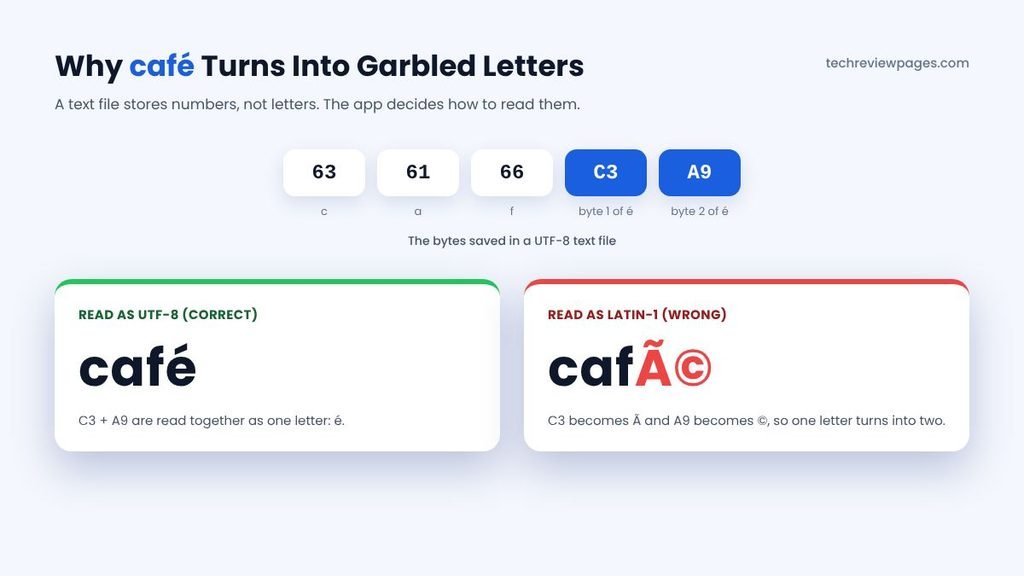
Here is how to avoid this frustrating encoding problem:
- Save your text as UTF-8. In Notepad on Windows 11, choose Save As, then set the Encoding to UTF-8. Recent versions of TextEdit and popular code editors such as VS Code offer a similar choice.
- Pick UTF-8 when an app asks. The LibreOffice desktop app shows an encoding box when you open a .txt file. On its command line, add the option –infilter=”Text (encoded):UTF8,LF,,,” as we did in our rerun.
- Paste instead of uploading, because when you paste text into a browser tool, the browser handles the encoding for you.
Other Free Online Text to PDF Converters
Plenty of sites offer a free online text to PDF converter. Most upload your file to their servers, while a few work inside your browser. Our test machine cannot upload files to outside sites, so we could not run our test file through them. Instead, this table shows what each one says on its own Google listing on October 29, 2026. Where a listing says nothing, we write “Listing does not say” rather than guess.
| Tool | What Its Listing Says | Other Scripts | Upload? |
|---|---|---|---|
| Tech Review Pages | Paste or open .txt files; headings, bullets; no sign-up | Yes, in Print mode (tested) | No, in browser |
| imagetotext.info | Converts a .txt file to PDF “without losing formatting,” in one click | Listing does not say | Listing does not say |
| ImageToText.cc | Creates a PDF from text in a few seconds, free, no sign-up | Listing does not say | Listing does not say |
| Adobe Acrobat online | Turns a text document into a high-quality PDF, keeping formatting | Listing does not say | Yes, upload |
| Smallpdf | Upload a .txt or Notepad file; no sign-up required | Listing does not say | Yes, upload |
| FreeConvert | Free, secure TXT to PDF in any browser | Listing does not say | Yes, upload |
| Drawboard | Client-side conversion, per Google’s AI Overview | Listing does not say | No, per AI Overview |
| PDFonFly | Online editor; searchable PDF; Unicode and right-to-left text | Yes, per its listing | Listing does not say |
| OnlineNotepad | Free, no sign-up; 4.7 stars from 152 Google ratings | Listing does not say | Listing does not say |
| TextToPDF.me | No sign-up and no limits | Listing does not say | Listing does not say |
For private notes, resumes or contracts, a converter that works in your browser is the safer pick. To check any site yourself, paste our test file into it, then look at the language lines in the PDF. If café, Arabic, Hindi and Chinese all look right, the converter handles your text well.
Can You Convert Text to PDF With iLovePDF?
Many people search for “convert text to PDF online free i love pdf.” iLovePDF does not list a tool called TXT to PDF. A third-party guide says you can open a .txt file in its Word to PDF tool, online or in its desktop app. We could not test that from our machine, so try one short file first. If your text is in another language or holds private details, our in-browser converter avoids the upload altogether.
How to Convert Text to PDF Without Any Website
Every major device already includes a free way to save text as a PDF. These methods work offline, which makes them especially useful for private or confidential documents.
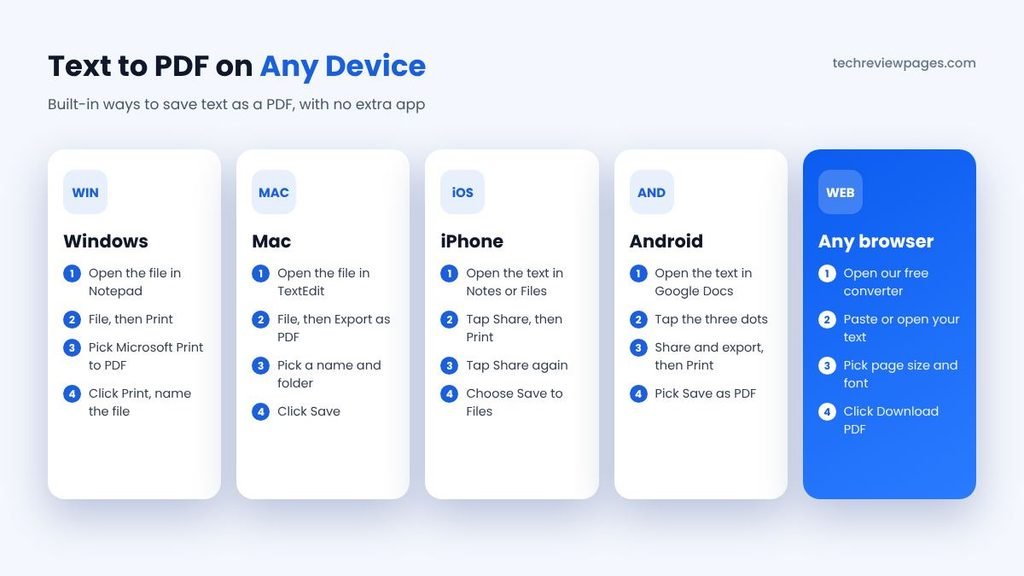
On Windows: Notepad Plus Microsoft Print to PDF
Open your text file in Notepad, then choose File, then Print. Pick “Microsoft Print to PDF” as the printer, click Print, then name your file. This approach works in almost any Windows application that can print.
On a Mac: TextEdit
Open the file in TextEdit, then choose File, then Export as PDF. Pick a name plus a folder, then click Save. You can also use File, then Print, then choose PDF in the lower corner of the print window.
On iPhone or Android: Built-In Print to PDF
On an iPhone, open the text in Notes or Files, tap Share, then tap Print. On the print preview, tap Share again, then choose Save to Files. On Android, open the text in Google Docs, then tap the three dots. Choose Share and export, then Print, before picking “Save as PDF.” Menu names can change between iOS and Android versions, so look for the Print option inside the Share menu if you do not see it right away.
In Word or Google Docs
If you need richer formatting, paste the text into Word or Google Docs before converting. In Word, choose File, then Save As, then PDF. In Google Docs, choose File, then Download, then PDF Document. This is a good route for a text resume, because you can add bold headings or adjust spacing before you save.
Tips for a Clean, Professional PDF
- Add a title, which appears at the top of the first page as well as in the PDF’s document details.
- Use headings to break up long text. In our tool, start a line with # for a big heading or ## for a smaller one.
- Pick the right font for the job. Sans serif reads well on screens, serif looks classic in print, while monospace keeps code or tables lined up.
- Choose sensible margins for your purpose. Normal one-inch margins suit most letters, while narrow margins fit more text on each page.
- Turn on page numbers for anything longer than two pages, so readers can follow along easily.
- Check the first page before you send the file, especially if your text contains accents or other languages.
Can AI Turn Text Into a PDF?
Some people search for “text to PDF AI,” hoping an AI tool will format their notes for them. Chat assistants can rewrite rough notes into a tidy layout, which you then copy into a converter. That helps when your text is messy. Just remember that AI may change your wording, so read it carefully before you make the PDF. For a simple, exact copy of your text, a regular converter is faster as well as safer.
Need to Go the Other Way?
If you have a PDF but want the words back out, you need a different tool that works in the opposite direction. Our free online PDF to text file converter extracts text from any PDF, including scanned pages with built-in OCR. It also runs fully in your browser.
Conclusion: Pick the Method That Fits Your Text
For everyday English text, converting to PDF is easy with almost any tool. Our free converter does it in about a second, keeps the file tiny, while never uploading your words. It also turns simple # or – marks into clean headings with bullet points.
The trouble starts with other languages or unusual encodings. In our test, a standard-font PDF replaced Arabic, Hindi and Chinese with question marks, while one converter turned café into café. Methods that use your browser’s print engine handled every script without a problem.
So match the method to your text. Use Download PDF for English, use Print to PDF for any other language, then save your files as UTF-8 to avoid garbled letters. Then take ten seconds to check the first page before you send it.
Frequently Asked Questions
What is the easiest way to convert text to PDF online free?
Paste or open your text in our free converter, choose a page size plus a font, then click Download PDF. It takes about a second, with no sign-up.
Can I copy and paste text to make a PDF?
Yes, you can. Paste copied text straight into the converter box, then download the PDF, which keeps your original line breaks.
How do I convert a .txt file to PDF?
Click “Open .txt file” in our tool, or drag the file onto the text box. You can also open it in Notepad or TextEdit, then save it as a PDF.
Why does my PDF show strange symbols instead of accents?
The converter read your file with the wrong encoding. Save the text as UTF-8, or paste it into a browser converter instead of uploading the file.
Can I convert Arabic, Hindi or Chinese text to PDF?
Yes, you can. Use our “Any language: Print to PDF” button, which uses your browser’s fonts. In our test, it kept all three scripts correctly.
How do I convert a text resume to PDF?
Paste it into our tool with a title plus normal margins. For more formatting, paste it into Word or Google Docs first, then save as PDF.
How do I convert text to PDF on my phone?
Visit this page on your phone, then paste your text into the box above. You can also use Print, then Save to Files on iPhone, or Save as PDF on Android.
Is it safe to convert text to PDF online?
The answer depends on the site, since many upload your text to their servers. Our tool works in your browser, so your text stays on your device.
