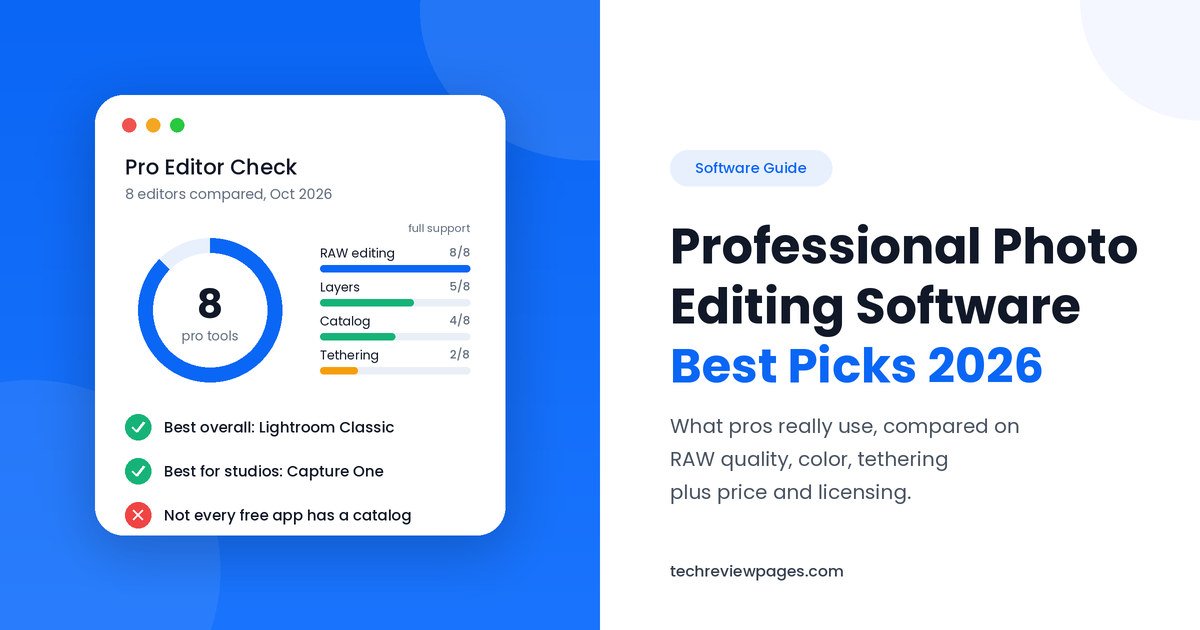
Professional photographers edit hundreds or even thousands of images each week. For them, photo editing software is a business tool. It has to handle large RAW files, keep colors accurate and deliver finished work to clients on time.
The tools that work for a casual user often fall short in a studio or at a wedding. That is why professionals choose their software with care. At Tech Review Pages, we compared 8 professional photo editing programs by RAW quality, color tools, workflow features and price as of October 2026.
This guide answers a common question: what do professional photographers use to edit their photos? It also covers a related question: what is the best photo editing software when your income depends on it? You will also find a pro feature checklist, the best tool for each type of photo work and a simple workflow you can copy. If you want options for every budget and skill level, see our main guide to the best photo editing software.
| Quick Answer: What Do Professional Photographers Use?Many working professionals use Adobe Lightroom Classic to sort and edit their photos, then Adobe Photoshop for detailed retouching.Studio and commercial photographers often choose Capture One Pro for its color accuracy and tethered shooting.Photographers who care most about RAW image quality often use DxO PhotoLab 10, which is famous for its noise reduction.Pros who want to avoid subscriptions often pick ON1 Photo RAW 2026 or the free Affinity app.Wedding and event photographers add AI culling tools to sort thousands of shots faster. |
How We Chose These Tools
For each tool, we checked the company’s own pricing and feature pages in October 2026. We also read independent reviews, release notes and photographer forum discussions. Then we compared each program on five things that matter to working pros:
• RAW image quality and camera support
• Color tools, including tethering and color management
• Catalog, batch editing and export features
• Price, licensing terms and cancellation rules
• Learning curve, speed and update history
Prices change often, so each price in this guide names the plan and the month we checked it.
What Makes Photo Editing Software “Professional”?
Almost any image editing software can crop a picture or add a filter. Basic picture editing software is fine for family photos, but professional photo editing software goes further. It must stay fast and reliable when a photographer works under a deadline.
These are the features that matter most to working pros:
• A strong RAW processing engine. Good RAW file processing pulls more detail from shadows and highlights.
• Accurate color tools. This includes white balance, color correction and color grading controls that match across many photos.
• A catalog module. Pros need to search, rate and keyword large photo libraries quickly.
• Batch processing and export presets. These let you apply edits to hundreds of photos, then export them in the right size for each client.
• Layers and masks. These allow precise edits to one part of an image, such as a face or the sky.
• Tethered shooting. This sends each photo from the camera straight to the computer during a studio shoot.
• Non-destructive editing. Your original file always stays safe, which protects your work if a client asks for changes.
• Color management and soft proofing. Soft proofing uses a printer’s ICC profile to show how a photo will look in print.
Advanced photo editing tools like AI masking, AI noise reduction and HDR editing are now common too. They save time, though the core features above still decide which program fits a professional photo workflow.
Professional Photo Editing Software Comparison
This photo editing software comparison shows how the top professional tools stack up. Prices are in US dollars and were checked in October 2026.
| Software | Best For | Platforms | Tether | Catalog | Layers | Price (Oct 2026) |
| Lightroom Classic | High-volume editing | Windows, Mac | Some brands | Yes | No | $11.99/mo, Lightroom plan, billed annually |
| Photoshop | Retouching | Windows, Mac, iPad, web | No | No | Yes | $19.99/mo, Photography plan, billed annually |
| Capture One Pro | Studio, color accuracy | Windows, Mac (iPad, iPhone on All-in-One) | Yes | Yes | Yes | About $18/mo annual, or about $350 once |
| DxO PhotoLab 10 | RAW quality, noise | Windows, Mac | No | Basic | No | $249.99 once |
| ON1 Photo RAW 2026 | All-in-one, no subscription | Windows, Mac | Canon, Nikon | Yes | Yes | 99once(199 MAX) |
| Affinity by Canva | Free retouching | Windows, Mac (iPad coming) | No | No | Yes | Free for individuals |
| Luminar Neo | Fast AI edits | Windows, Mac | No | Basic | Yes | $79/yr, or $129 to $199 once |
| Darktable | Free open-source RAW | Windows, Mac, Linux | Yes | Yes | Masks only | Free |
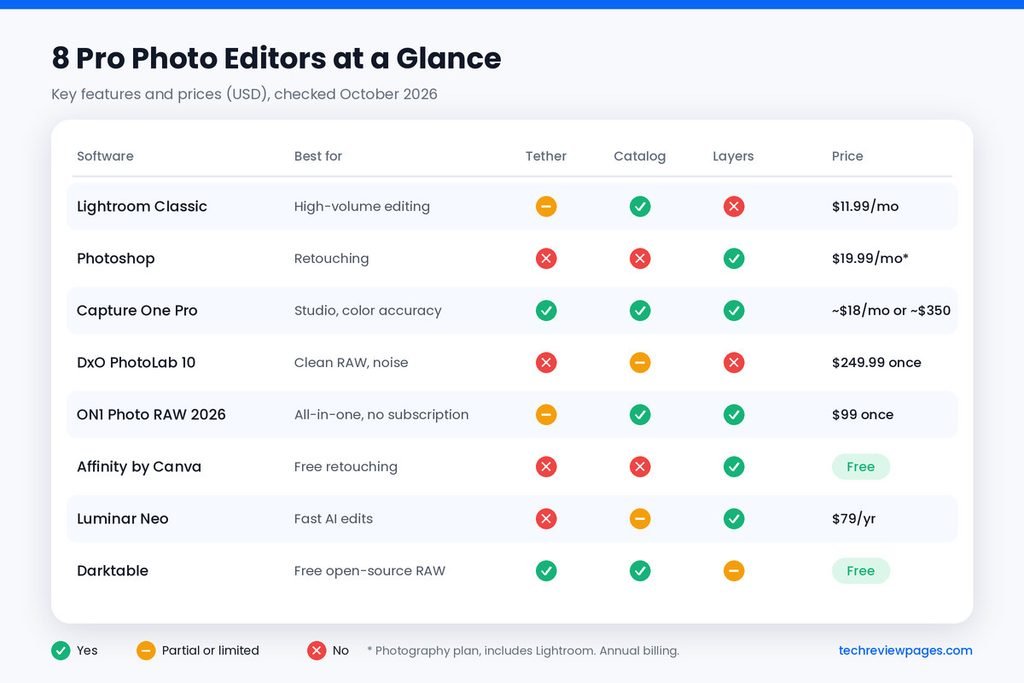
Lightroom Classic does not offer full layers. Most pros pair it with Photoshop for that reason. Lightroom Classic includes basic tethering for some camera brands. ON1 tethering works with Canon and Nikon cameras, while Capture One supports the widest range of tethered workflows.
8 Best Photo Editing Software for Professionals
1. Adobe Lightroom Classic: Best Overall for Working Pros
Adobe Lightroom Classic is one of the most common choices among professional photographers. When pros discuss the best software editing photos at scale, Lightroom Classic usually comes up first. Its catalog module can manage hundreds of thousands of images. You can rate, flag and keyword photos, then find any shot in seconds.
The Develop module covers exposure adjustment, white balance, curves and levels, plus noise reduction. A live histogram shows your exposure, while the Detail panel handles sharpening for print or web. Its AI masking can select a subject or sky in one click. You can sync edits across a full wedding gallery, then use export presets to create web, print and social versions at once.
Lightroom Classic comes in Adobe’s Lightroom (1TB) plan for $11.99 per month, billed annually, according to Adobe’s pricing page in October 2026. The Photography (1TB) plan adds Photoshop for $19.99 per month on the same billing. Older guides may list a $9.99 price, but Adobe raised the Lightroom plan to $11.99 in January 2025. Photoshop alone costs more than the bundle, so most photographers choose the Photography plan.
• Best for: Wedding photographers, event shooters and anyone with a large library.
• Watch out for: It has no true layers. Adobe’s annual plan also charges a fee if you cancel early.
Lightroom vs Lightroom Classic: What Is the Difference?
Adobe sells two apps with similar names, which confuses many buyers. Lightroom Classic is a desktop app that stores your photos on your own drives. It has the deepest catalog tools, so many pros use it for large client archives.
Lightroom, without “Classic” in the name, is a cloud-based app. It syncs your photos across your computer, phone, tablet and web browser. It is simpler, which suits photographers who edit on the go. Since January 2025, Adobe’s Lightroom (1TB) plan includes both apps, so you can use either one.
2. Adobe Photoshop: Best Photo Retouching Software
Adobe Photoshop is widely seen as the industry standard photo retouching software. It handles work that Lightroom cannot do, such as skin retouching, combining several images or removing large objects.
Photoshop’s brush tools, clone stamp and healing brush give pixel-level control. The liquify tool can reshape small details, though careful use matters for ethical reasons. Generative Fill uses AI to extend a background or remove distractions from a short text prompt.
Most pros get Photoshop through the Photography plan, which also includes Lightroom. Read our Photoshop vs Lightroom comparison to see how the two apps split the work.
• Best for: Portrait retouching, beauty work, fashion and composite images.
• What users say: Many pros praise the tools but dislike being tied to a subscription.
3. Capture One Pro: Best for Studio and Commercial Photographers
Capture One Pro is a leading rival to Lightroom in professional studios. Many commercial photographers choose it for its color science, which refers to how the software turns RAW data into natural colors. Its tethered shooting is fast and stable, so clients can see each shot on a big screen during the session.
After a 6% price rise that took effect at renewals from July 2026, the Pro plan costs about $18 per month on an annual plan. A one-time license sells for roughly $350. Capture One’s own pricing page hides prices until checkout, so confirm the final figure there. The Studio plan costs about $48.50 per month on an annual plan, which suits photo editing software for teams.
• Best for: Product photography, fashion, catalog work and studio portraits.
• What users say: After two price rises, some photography news sites asked whether it is still worth the cost.
4. DxO PhotoLab 10: Best for RAW Photo Editing Quality
DxO PhotoLab is the choice of many landscape and wildlife photographers who want the cleanest RAW photo editing results. Its DeepPRIME noise reduction is widely praised for low-light shots. Automatic lens correction uses DxO’s large library of camera and lens profiles.
DxO released PhotoLab 10 on September 1, 2026. The new version costs $249.99 from DxO. Owners of version 8 or 9 can upgrade for $129.99. New features include AI depth masks, a color wheel for color grading and AI dust removal.
PhotoLab 10 can also send photos to Affinity and back for retouching. Read our full DxO PhotoLab 10 review for details.
• Best for: Landscape, wildlife and night photography.
• Watch out for: Its photo library tools are basic, so many pros pair it with a separate catalog app.
5. ON1 Photo RAW 2026: Best All-in-One Without a Subscription
ON1 Photo RAW 2026 combines a photo organizer, RAW editor, layers and effects in one app. It includes AI masks for subjects, skies or backgrounds. It also offers sky replacement, panoramas and HDR editing.
The standard version costs $99 as a one-time purchase, while the MAX edition costs $199, according to a published review from August 2026. The same review notes that ON1 often sells it for half price during sales. ON1 also offers subscription bundles with cloud storage.
• Best for: Freelancers and small studios who want many tools for a single payment.
• Watch out for: The interface can feel crowded, and its AI subject masks are not always accurate.
6. Affinity by Canva: Best Free Professional Retouching Tool
Affinity Photo was first built by a company called Serif as a paid alternative to Photoshop. Canva bought Serif, then merged Affinity Photo, Designer and Publisher into one free app in October 2025.
Affinity offers layers, masks, RAW editing and advanced retouching tools that many pros use for client work. Affinity is free for individuals on Windows or Mac, with an iPad version on the way. Canva’s AI tools inside Affinity require a paid Canva plan. Read our full Affinity by Canva review for a closer look.
• Best for: Freelancers who need Photoshop-style retouching with no monthly cost.
• Watch out for: It has no catalog, so you will need a separate tool to manage large libraries.
7. Luminar Neo: Best for Fast AI Edits
Luminar Neo from Skylum uses AI to speed up creative edits. Tools like sky replacement and relighting can finish in seconds what would take minutes in Photoshop. Some pros use it as a plugin for quick creative looks.
Skylum changes its prices often during sales. In 2026, published prices ranged from $79 per year for the subscription to between $129 and $199 for a one-time license, depending on the edition. It is less suited to strict color work, so most professionals use it as a second tool.
8. Darktable: Best Free Open-Source RAW Editor for Pros
Darktable is a free, open-source RAW editor for Windows, Mac and Linux. It offers a catalog, tethering, masks and detailed color tools. Many Linux-based professionals use it as their main editor.
Darktable is powerful, but it is also complex. Expect to spend several weeks learning it before you use it for paid work.
Other Tools Professionals Mention
A few other programs come up often in photo editing software reviews. Pixelmator Pro is a Mac-only editor that Apple owns. ACDSee Photo Studio Professional 2027 costs $119.99 and combines fast browsing with RAW editing. Corel PaintShop Pro is popular with home users on Windows, though few pros use it as their main tool.
Topaz Photo from Topaz Labs is a popular AI tool for sharpening, noise removal and upscaling small images. It was listed at $199 on the Topaz Labs store in October 2026. Many pros use it as a plugin with Lightroom or Photoshop.
On Windows, some photographers browse and compare shots with FastStone Image Viewer. It is free for personal use, while business users need a paid license.
Sports photographers and photojournalists often use Photo Mechanic to sort photos quickly before editing. It is a fast photo browser, so it works alongside an editor rather than replacing one.
Best Professional Photo Editing Software by Type of Work
Different kinds of photography need different strengths. This table matches each type of professional work with the tools that fit it best.
| Type of Work | Main Editor | Helper Tool | Why |
| Wedding photographers | Lightroom Classic | AI culling tool | Fast sorting plus batch edits for large galleries |
| Portrait retouching | Photoshop | Lightroom Classic | Pixel-level skin and detail control |
| Product photography | Capture One Pro | Photoshop | Tethering plus accurate brand colors |
| Real estate photos | Lightroom Classic | Photoshop or ON1 | HDR merging plus window and sky fixes |
| Landscape and travel photography | DxO PhotoLab 10 | Lightroom Classic | Clean RAW files plus lens correction |
| News and sports | Photo Mechanic | Lightroom or Photoshop | Speed for tight deadlines |
| Instagram content | Lightroom (mobile + desktop) | Canva | Presets that sync across devices |
| Freelancers on a budget | ON1 Photo RAW or Darktable | Affinity | Pro tools without a subscription |
How Professionals Build a Photo Editing Workflow
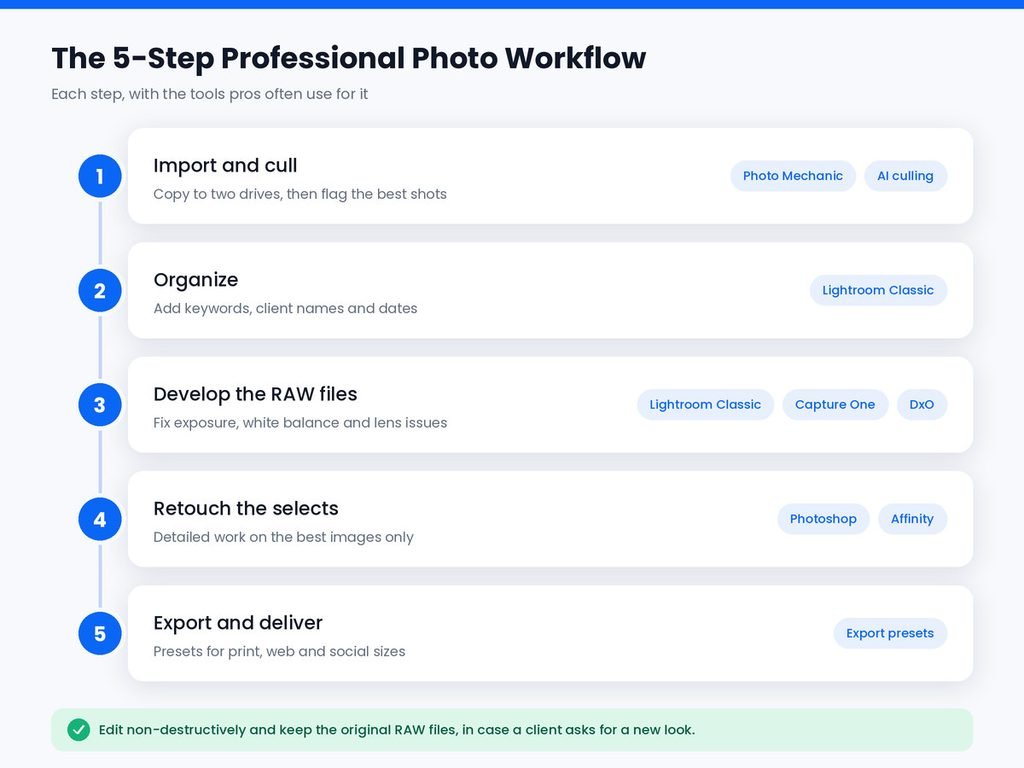
Professionals rarely do everything in one program. Instead, they build a photo workflow with clear steps. Here is a simple five-step workflow that many working photographers follow.
1. Import and cull. Copy photos to two drives right away. Then pick the best shots with flags or star ratings.
2. Organize. Add keywords, client names and dates in your catalog. This makes old photos easy to find later.
3. Develop the RAW files. Fix exposure, white balance and lens problems. Sync these settings across similar shots.
4. Retouch the selects. Send only the best images to Photoshop or Affinity for detailed work.
5. Export and deliver. Use export presets for each output, such as full-size print files and small web images.
A clear workflow saves hours on every job. It also keeps your original RAW files untouched, which protects you if a client asks for a different look later.
How AI Is Changing Professional Photo Editing
AI tools now handle many slow, repetitive tasks. AI masking selects a person or sky in one click. AI noise reduction cleans up high-ISO photos from dark venues. Generative tools can remove distractions that once took a retoucher several minutes.
Wedding photographers also use AI culling services such as Aftershoot or Imagen. These tools scan a full shoot, then suggest which photos to keep based on focus, closed eyes and duplicates. Some can also apply your editing style automatically. Imagen, for example, charges per photo on its pay-as-you-go plan, with a $7 monthly minimum. Its unlimited Limitless plan costs $179 per month when billed yearly, according to its pricing page in October 2026. Culling is included in that plan, or costs from $29 per month as an add-on.
AI saves time, but it does not replace your judgment. Always check AI edits before delivery. You can compare more of these tools in our list of the best AI photo editors.
Case Study: The World Press Photo Disqualifications
In 2015, the World Press Photo contest showed how editing choices can affect a professional photographer’s career. Nearly 98,000 images were entered that year, according to iMediaEthics. Before the final round, the organizers asked the remaining entrants for their original, unprocessed files.
Independent experts compared the originals with the submitted images. The jury then disqualified 20 entries in the penultimate, or second-to-last, round. World Press Photo said this was 22% of the entries still in competition at that stage. Many news reports rounded it to one in five. The year before, only 8% were disqualified at the same stage.
Some photographers removed small details to clean up the frame. Others used heavy toning that changed how the scene looked.
Lars Boering the contest’s managing director, said the content of a news image should not be altered. He described some photographers as careless in post-processing.
What Professionals Can Learn From This
1. Know the editing rules for your type of work. News and contest photos allow far less change than advertising or fashion images.
2. Use non-destructive editing, so you can always return to the original file.
3. Keep your RAW files safe, since contests, clients or publishers may ask to see them.
4. Be careful with heavy toning, the clone stamp and generative tools on documentary images.
5. Save your edit history or a copy of each version for important jobs.
Subscription or One-Time Purchase: Which Is Better for Pros?
Paid photo editing software comes in two main pricing plans. A subscription gives you constant updates and cloud storage. A perpetual license costs more at the start, but you own that version.
Many pros treat software as a business expense, so the monthly fee matters less than speed. Others prefer to pay once, especially freelancers with uneven income. We list the strongest one-time options in our guide to photo editing software with no subscription.
Always use the free trial before you commit. Most professional tools offer one for 7 to 30 days. Students can often get a student discount on Adobe and other paid plans.
What Computer Do You Need for Professional Photo Editing?
Professional RAW files are large, especially from high-resolution cameras. A slow computer can waste hours each week. Most professionals work in desktop photo editors rather than phone apps for this reason.
Adobe lists 8GB of RAM as the minimum for Lightroom Classic and recommends 16GB or more. For full speed with AI tools like Denoise, Adobe recommends 8GB of dedicated graphics memory on Windows. On a Mac, it recommends Apple silicon with 16GB of unified memory.
Some other editors need even more memory. A published review of ON1 Photo RAW 2026 lists 32GB of RAM or more as recommended, with at least 4GB of video memory. A color-calibrated monitor also matters, since your edits should look the same on a client’s screen or in print.
Is Free Photo Editing Software Good Enough for Professionals?
Many photographers ask, “What is the best free photo editing software for professional work?” Free photo editing software has improved a lot. Affinity offers Photoshop-level retouching, while Darktable offers a full RAW workflow with a catalog.
Still, most pros pay for at least one tool. Paid software usually offers faster performance, better camera support and dependable updates. If you want to compare the best photo editing software free options in detail, read our guide to the best free photo editing software.
What If You Are Just Starting Out?
Professional tools can feel overwhelming at first. If you are new, start with simple digital photo editing tools. Learn the basics of exposure and color first. Our guide to the best photo editing software for beginners explains where to begin. Photo editing for beginners is much easier when you learn one program well before adding a second.
Conclusion
So, what is the best software for photo editing at a professional level? For many working photographers, the answer is Adobe Lightroom Classic paired with Photoshop. This combination covers sorting, RAW editing and detailed retouching in one plan.
Your type of work may point you elsewhere. Product photographers often get better color and tethering from Capture One Pro. Landscape shooters may prefer the clean RAW files from DxO PhotoLab 10. Freelancers who want to avoid monthly bills can build a strong setup with ON1 Photo RAW, Affinity or Darktable.
Whatever you choose, build a clear workflow and protect your original files. The World Press Photo case shows that editing choices can matter as much as the photo itself.
Start with free trials, then test each program on a real job. The right professional photo editing software should save you time on every shoot. For tools at every price, return to our main guide to the best photo editing software.
Frequently Asked Questions
What do professional photographers use to edit their photos?
Many professional photographers use Adobe Lightroom Classic for sorting and RAW editing. They use Photoshop for detailed retouching. Studio photographers often use Capture One Pro instead of Lightroom.
Which software is best for professional photo editing?
Lightroom Classic is the best all-round choice for professional photo editing. Capture One Pro is better for studio work, while DxO PhotoLab 10 offers the cleanest RAW results.
Which is better, Photoshop or Lightroom?
Neither is better for every task. Lightroom is better for organizing and editing many photos quickly. Photoshop is better for detailed retouching on a single image. Most professionals use both apps together.
What is the #1 photo editing app?
Adobe Lightroom is one of the most popular photo editing apps among photographers, since it works on desktop, phones and tablets. For quick mobile edits, Snapseed is a popular free choice. See our list of the best photo editing apps.
What is the best software for editing photos for a small photography business?
For a small business, Lightroom Classic is usually the best software for editing photos. ON1 Photo RAW is a strong choice if you want to avoid subscriptions. Many studios that need team accounts choose Capture One Studio.
What free photo editing software is the best for pros?
Darktable is the best free RAW editor for pros, and Affinity is the best free retouching tool. Together, they cover most professional needs at no cost.
Do professional photographers edit every photo?
Most pros edit every photo they deliver, though not in the same depth. They apply quick batch edits to the full set, then spend extra time retouching the best images.