

A good headshot used to cost a studio booking, a nice outfit and an hour of awkward smiling. Now a free AI headshot generator promises the same result from one selfie. You upload a photo, pick a style, then download a polished business portrait a few minutes later.
The word “free” hides a lot, though. Some tools give you one headshot, while others hand out credits or put you on a waitlist. A few ask for an account before you see anything at all.
This guide from Tech Review Pages checks what ten popular tools really offer at no cost. You will also learn how to make an AI headshot look like you, plus the signs that give a fake one away.
Quick Answer: Is There a Free AI Headshot Generator?
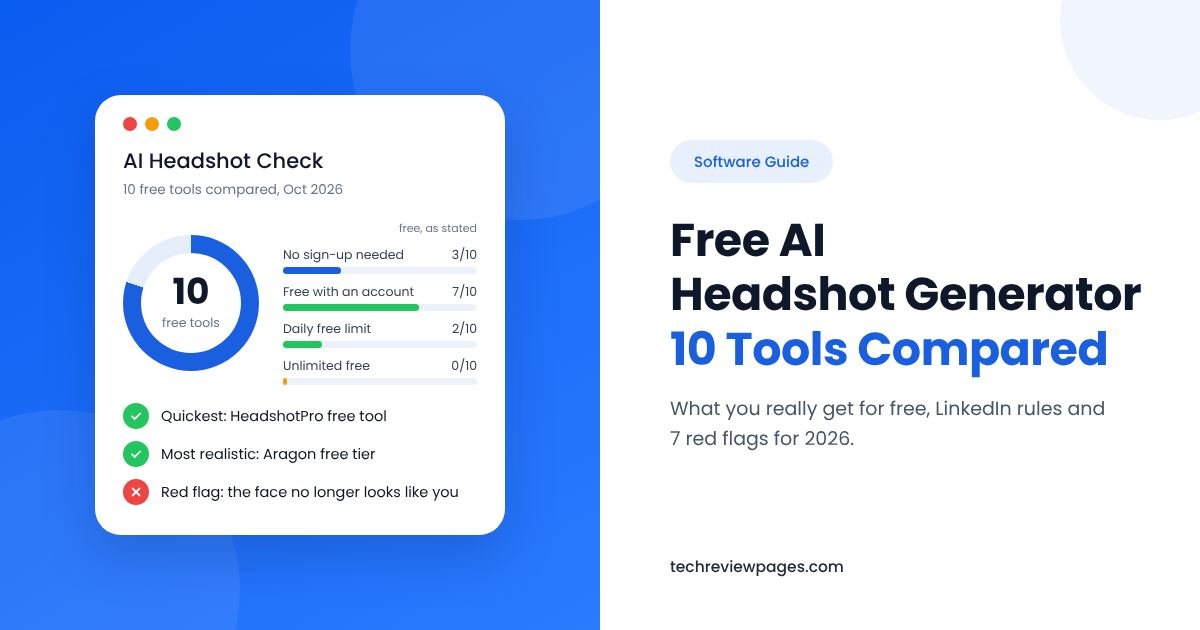
Yes, but most are “free to try.” HeadshotPro’s free tool offers one headshot with no sign-up, based on its Google listing. Adobe Firefly gives free daily generations with a free Adobe account.
For the most free photos, use a chatbot like Google Gemini or ChatGPT with your selfie and a clear prompt. Daily limits apply.
For the most realistic results, pick a tool that learns your face from several selfies, such as Aragon’s free tier.
Before you post, check hair edges, ears, teeth and collars. The photo must still look like you.
What Is a Free AI Headshot Generator?
A free AI headshot generator is an online tool that turns a regular selfie into a professional-looking headshot at no cost. It uses generative AI to change your clothes, lighting and background while keeping your face. The result looks like a business portrait taken in a studio.
People use these tools for an AI LinkedIn photo, a resume photo, a company website or a speaker bio. Some brands call their product an AI headshot maker or an AI headshot creator instead. The name changes, but the job stays the same.
A headshot editor is a little different. It improves a photo you already have, like fixing light or removing a messy background, without generating a new image. Many tools now mix both features.
How Do AI Headshot Generators Work?
Not every AI headshot tool works the same way. Knowing the method helps you guess how real your photo will look, plus how long it will take.
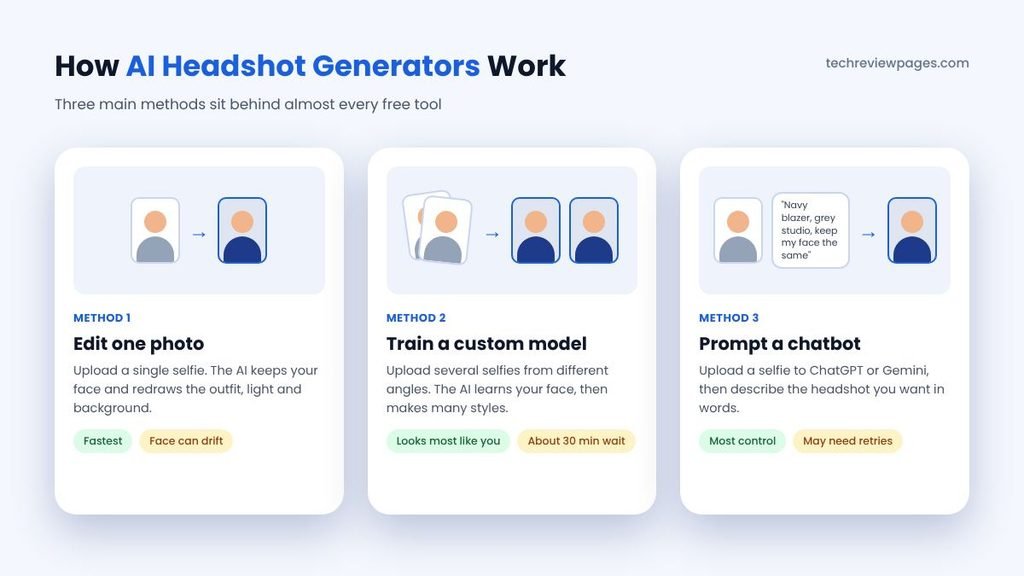
Method 1: Edit One Photo
After you upload a single selfie, the AI keeps your face while it redraws your outfit, lighting and background. This is the fastest method, which is why most free tools use it. The downside is that one photo gives the AI little to work with, so results can drift from your real look.
Method 2: Train a Custom Model
You upload several selfies taken from different angles. The AI studies your face first, then creates many headshots in different styles. Aragon works this way, asking for a few phone selfies and delivering results in about 30 minutes. This method usually looks the most like you, though free plans keep the number of photos small.
Method 3: Prompt a Chatbot
You upload a selfie to a general AI tool, such as ChatGPT or Google Gemini, then describe the headshot you want. This gives you the most control over style. You can even use it as a free AI portrait generator for an artistic social media picture, though that look does not suit LinkedIn. Faces can still shift, so you may need several tries to get a close match.
Best Free AI Headshot Generators in 2026: What You Really Get
So, are there any free AI headshot generators that truly cost nothing? A few come close, as long as you accept some limits. We compared ten popular tools on what you get for free, not on paid features.
How We Checked These Tools
Last checked: October 29, 2026.
What we did: we read each tool’s own page, its Google listing and its help pages where we could reach them. We recorded what each one says about free use, sign-up, payment details and watermarks.
What we did not do: we did not upload anyone’s face to these tools, so we cannot rate how much each result looks like you. Where a tool’s page does not say something, we write “Not stated” instead of guessing.
Why it matters: free limits change often, so treat this as a snapshot and check the tool before you upload.
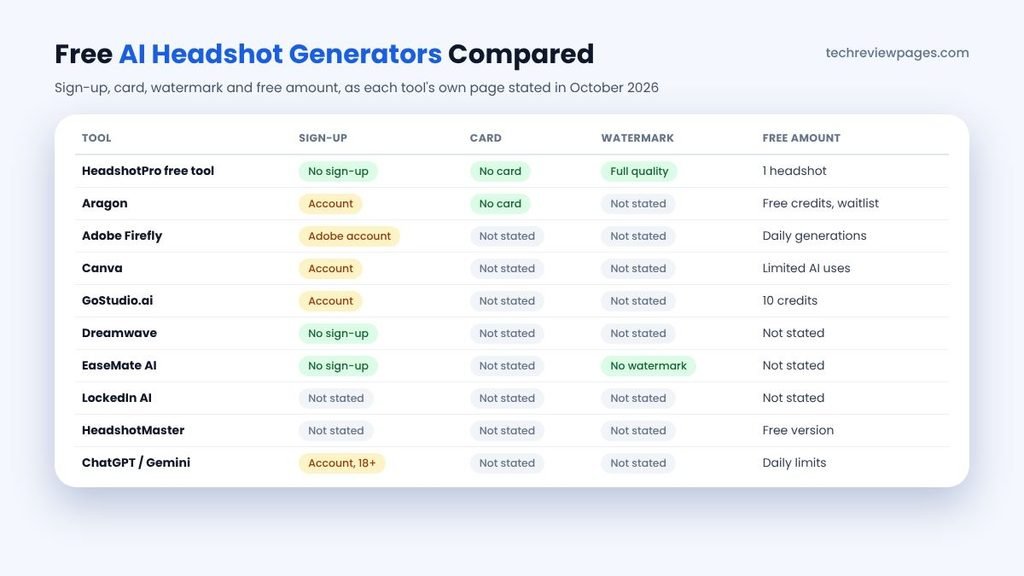
| Tool | How It Works | What Is Free | Watch Out For |
|---|---|---|---|
| HeadshotPro free tool | One selfie in, one headshot out | One full-quality download, no sign-up or card (Google listing) | Most styles sit in paid packs |
| Aragon | A few selfies, about 30 minutes | Free credits with an account; no payment details | Free use runs on a waitlist that “may be paused or delayed” |
| Adobe Firefly | Reference photo plus a text prompt | Free daily generations with an Adobe account | 18+ only; more volume needs a paid plan |
| Canva | Upload a selfie, pick options such as gender identity | Limited free AI uses with a Canva account | Some AI features need Canva Pro |
| GoStudio.ai | One selfie, 20 styles like LinkedIn, CEO and resume | 10 free credits after sign-up | Credits run out fast |
| Dreamwave | Says its AI comes from MIT and has made 25 million headshots | Says no sign-up is needed | Free amount not stated |
| EaseMate AI | Drop in any photo for a business-ready shot | Says results are watermark-free, with no sign-up | Free amount not stated |
| LockedIn AI | Says it trained on thousands of professional portraits | Free tool page; limits not stated | Check limits before you upload |
| HeadshotMaster | Says it offers 300+ styles | Its listing says a free version exists | No user reviews on its software listing yet |
| ChatGPT or Google Gemini | Upload a selfie, then write a prompt | Daily image limits; Gemini’s free downloads are 1K | Faces can drift; editing needs an 18+ account |
Our take: for one quick LinkedIn photo, HeadshotPro’s free tool or Adobe Firefly is the easiest start. For a realistic set of photos, Aragon’s free tier is worth the wait. Its Google listing shows 4.9 stars from about 7,000 ratings. Its page also says 2.5 million professionals have used it, though both figures come from the company. For full creative control at no cost, a chatbot with a good prompt works well.
Why Canva Asks for Your Gender Identity
Canva’s headshot tool asks you to select your gender identity before it creates a result. That choice guides the clothes, hair and styling the AI draws. If the option list does not fit you, the outfit may feel wrong. Pick the closest match, then use the prompt tips below to steer the look. This step also shows how much these tools guess, which links to the bias case study later in this guide.
Truly Free AI Headshot Generator: Does One Exist?
Some people drop the word AI and search for a free headshot generator, but almost every tool in that search uses AI today. Hardly any of them give you unlimited free headshots. Running image models costs money, so companies limit free use. The closest you get to a truly free AI headshot generator is a chatbot’s free plan, which resets each day. You can also mix tools, taking one free headshot from each until you find a style you like.
Free AI Headshot Generator With No Sign-Up
If you want to skip creating an account, look at HeadshotPro’s free tool, Dreamwave or EaseMate AI. Each one says no sign-up is needed. Adobe Firefly, Canva, Aragon, GoStudio and the chatbots all ask you to log in first.
Free AI Headshot Generator Without a Watermark
A watermark ruins a professional profile photo. EaseMate AI says its results are watermark-free. HeadshotPro says its free download is full quality. For every other tool, download one test image first, then check the corners before you rely on it.
What Real Users Say About Free AI Headshots
Many people search for “free AI headshot generator Reddit” because they want honest opinions, not sales pages. One useful example is a Microsoft Tech Community thread from January 2026. A user asked for a free tool for a LinkedIn photo, with no distorted features. Replies over the next few months made three points. Input photo quality mattered most. Some free results looked obviously AI-made. One user said only a few images out of dozens were usable.
Reddit threads follow the same pattern. When you read them, look for posts that show the original selfie next to the result. Check whether the poster paid, because “free” often means a free preview. Be careful with tool links in replies, since some come from the makers themselves.
How to Generate Professional Headshots With AI for Free
If you want a professional headshot online free of charge, the photo you upload matters more than the tool you pick. As Gizmodo noted in June 2026, output quality “depends heavily on what you upload.” Follow these steps for the best results.
- Take clear selfies in daylight. Stand facing a window so light falls evenly on your face. Avoid harsh shadows or overhead lamps.
- Use several angles. Take a front view plus a few slight turns to each side. Tools that train on your face need this variety.
- Keep your face clear. Remove sunglasses, hats or anything covering your face, then wear your usual hairstyle.
- Use a plain background. A simple wall helps the AI separate you from the scene.
- Upload a large file. Adobe Firefly, for example, asks for at least 512 x 512 pixels, because bigger photos keep more detail.
- Pick a style that fits your field. A lawyer might choose a dark suit and grey backdrop. A designer might pick a casual shirt with soft light.
- Generate several options, then choose the one that looks most like you, not the one that looks most perfect.
If your headshot looks soft, our guide to the free AI image upscaler tools explains how to add sharpness without changing your face. To clean up a messy backdrop on a real photo instead, see our free AI background remover guide.
Can ChatGPT Create a Headshot? A Free Prompt to Try
Yes, ChatGPT and Google Gemini can both edit an uploaded selfie into a headshot. Google’s Gemini help page says you can upload an image and ask for edits, but you must be 18 or older. It also asks you not to break anyone’s privacy rights. Rules and limits for both chatbots change often, so check them on the day you try. The key to a good result is a clear prompt that tells the AI to keep your face the same. Copy this prompt, then change the parts in brackets:
Free AI Headshot Prompt (copy and edit)
“Turn this photo into a professional corporate headshot. Keep my face, skin tone, hair and eye color exactly the same. Dress me in a [navy blazer with a white shirt]. Use a [plain light grey studio background] with soft, even lighting. Show me from the chest up, looking at the camera with a [friendly, closed-mouth smile]. Make it look like a real photo, not a painting.”
The most important line is the one about keeping your face, skin tone and eye color the same. Without it, the AI may “improve” you into someone else. Our case study below shows why this matters.
Best Uses for a Free AI Professional Headshot Generator
A free AI professional headshot generator fits some jobs better than others. Here is where it shines, along with where a real photo still wins.
LinkedIn and Resume Photos
This is the most popular use by far. A clean AI business headshot helps your profile look finished, which matters for personal branding when recruiters scan dozens of profiles a day. In countries where resume photos are common, the same image can work there too.
AI Corporate Headshots for Teams
Small companies often need matching photos for a team page. An AI tool can give everyone the same background, lighting and dress style, even when staff work remotely in different cities. Free plans rarely cover a whole team, so expect to pay for larger groups.
Freelancer and Creator Profiles
Freelancers, consultants and coaches use these tools for marketplace profiles, speaker bios or a personal website. Because these sites show small images, a free AI business photo generator is often all you need.
When a Real Photo Is Better
Skip AI for ID documents, press kits or any role where people must recognize you instantly. In those cases, a photographer who captures your real face is the safer choice.
Free AI Headshot Generator for LinkedIn: Is It Allowed?
LinkedIn does not ban AI headshots by name. However, its Professional Community Policies set one clear rule: “Do not use an image of someone else, or any other image that is not your likeness, for your profile photo.”
So an AI LinkedIn photo is fine as long as it truly looks like you. Recruiters and clients will meet you on video calls or in person. If your photo looks nothing like the real you, it can hurt trust instead of building it.
- Keep it current: use a headshot that matches how you look today.
- Keep it simple: a plain background with good light works best at small sizes.
- Frame your face: show your head and shoulders, with your face filling most of the frame.
- Avoid heavy effects: plastic skin or a perfect jawline can look fake to people who know you.
Do AI Headshots Look Real? 7 Red Flags to Check
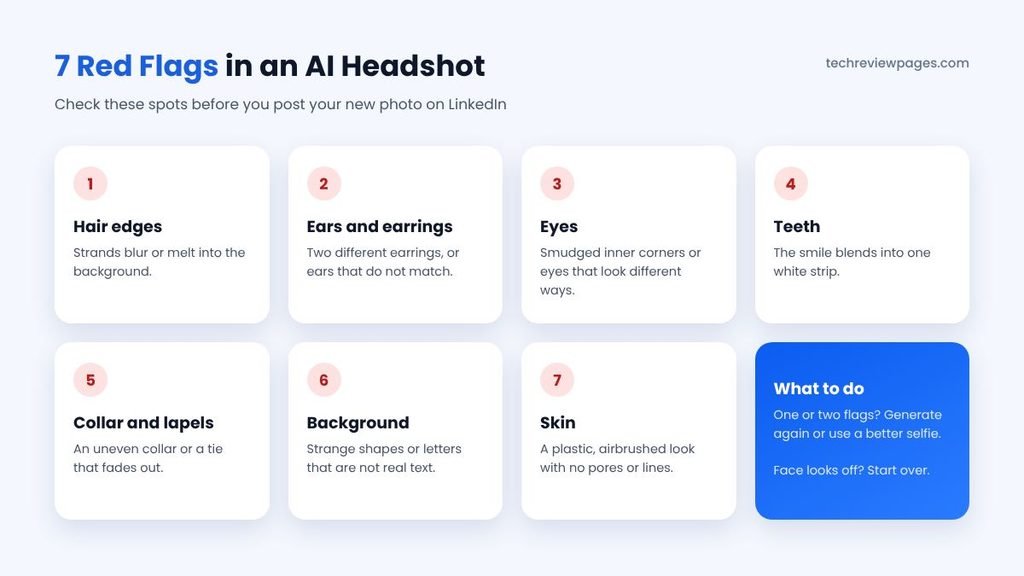
A realistic AI headshot can be hard to tell from a studio photo. A weak one gives itself away in a few common spots. Gizmodo noted in 2026 that hair, hands and the inner corners of the eyes are still where AI mistakes appear most often.
- Hair edges: strands that blur or melt into the background.
- Ears and earrings: two different earrings, or ears that do not match.
- Eyes: smudged inner corners or eyes that point in slightly different directions.
- Teeth: a smile where the teeth blend into one white strip.
- Collar and lapels: a shirt collar that is uneven or a tie that fades out.
- Background: strange shapes or letters that are not real text.
- Skin: a plastic, airbrushed look with no pores or natural lines.
If you spot one or two of these, try another generation or a different selfie. If the face itself looks off, start over with better photos.
Free AI Headshots vs Paid AI Headshots vs a Photographer
A free tool is not always the right choice, so here is how the three options compare for most people.
| Option | Cost | Best For | Main Drawback |
|---|---|---|---|
| Free AI headshot generator | Free, with limits | A quick LinkedIn or resume photo | Few styles, waitlists or credits |
| Paid AI headshot service | A one-time fee per pack | Many styles, higher resolution, team photos | You share many selfies with a company |
| Professional photographer | Usually the highest | Executives, actors, press photos | Needs time, travel and booking |
For high-stakes uses, like an executive profile or a magazine feature, Gizmodo suggests a real photographer may still be the better pick. If you are an actor or model, ask your agent what they accept before you use an AI headshot.
One more warning: an AI headshot is not an ID photo. Passports and visas ban AI changes, so read our AI passport photo maker guide before you use any tool for official documents.
Which AI Photo Editor Is Totally Free?
Sometimes you do not need a new headshot at all. You may already have a good photo that just needs better light or a cleaner background. In that case, a free AI photo editor is the better tool, because it keeps your real face.
Windows Photos, for example, includes free AI tools such as background blur and object erase. Canva’s free plan also covers basic edits. For a full list of no-cost options, see our guide to the best free photo editing software. Most “totally free” editors still limit their newest AI features, so expect some trade-offs.
Only Upload Your Own Photos
AI headshot tools make it easy to upload any face. That does not make it right. Use these tools only on photos of yourself, or with clear permission from the person in the photo.
- Privacy: a person’s face is personal data. Google asks Gemini users not to violate others’ privacy rights.
- Age rules: Adobe Firefly and Gemini photo editing both require users to be 18 or older.
- Trust: a fake headshot of someone else can mislead employers, clients or friends. LinkedIn bans profile photos that are not your likeness.
- Team photos: if you make headshots for coworkers, get each person’s consent first, then let them approve the final image.
Are Free AI Headshot Generators Safe? Privacy Tips
Your face is personal data, so think before you share it. When you upload selfies, you hand them to a company that may store them on its servers. Free tools are a business, so it pays to read the fine print.
- Read the privacy policy. Find out how long the tool stores your selfies and whether it uses them for training.
- Check for a delete option. Aragon, for example, says you can delete your account and data at any time.
- Check the age rules. Adobe Firefly asks users to confirm they are 18 or older before uploading a reference photo.
- Share only what you need. Upload the fewest photos the tool asks for.
- Check commercial rights. Adobe says Firefly models are “trained exclusively on Adobe Stock, licensed content and public domain materials,” so it calls results safe for commercial use. Other tools may limit use to personal profiles.
Case Study: When an AI Headshot Changed a Student’s Face
In July 2023, Rona Wang tested an AI image tool called Playground AI. She was a 24-year-old Asian American who had just graduated from MIT in math and computer science. She uploaded a smiling selfie in a red MIT sweatshirt. Then she asked the tool to turn it into “a professional LinkedIn profile photo.”
The result looked almost the same as her photo, with one big difference. Her skin looked lighter, and her dark eyes had turned blue. As The Boston Globe reported, she said it gave her “features that made me look Caucasian.” PetaPixel noted that her first reaction was “amusement,” though she welcomed the wider talk about AI bias.
Playground AI’s founder, Suhail Doshi, replied that the models “aren’t instructable like that.” He added that the company was “quite displeased with this” and hoped to fix it. He also said Playground did not support AI photo avatars as a use. The story spread widely, because it showed a real risk that still applies to AI headshot tools today.
Lessons From This Case
- AI may “fix” you into someone else. A vague prompt like “make it professional” can change your skin tone, eyes or features.
- Tell the AI what to keep. Ask it to keep your face, skin tone, hair and eye color the same.
- Use tools built for headshots. Tools that train on several of your selfies usually stay closer to your real look.
- Always do a likeness check. Ask a friend whether the photo looks like you before you post it.
Conclusion
A free AI headshot generator can give you a polished photo in minutes, without a studio or a photographer. That makes it a great option for a job search, a new LinkedIn profile or a quick team page update.
Just remember what “free” usually means. Most tools give you a taste, then ask you to pay for more styles or higher quality. Pick the tool that matches your need, whether that is one quick photo, a realistic set or full creative control.
Above all, do a likeness check. Upload clear selfies, tell the AI to keep your real features and inspect the result for red flags. If a friend would recognize you instantly, your new headshot is ready to use. If not, try again, because a headshot that looks like a stranger costs you more trust than it earns.
Frequently Asked Questions
Is there a free AI headshot generator?
Yes, several exist. HeadshotPro’s free tool, Adobe Firefly, Aragon, GoStudio.ai and chatbots like Google Gemini all offer some free use. Most limit how many headshots you get.
What is the best AI headshot generator free of charge?
The answer depends on your goal. HeadshotPro’s free tool is quick for one photo. Aragon’s free tier is best for realistic results, while a chatbot gives you the most control.
How do I generate professional headshots with AI for free?
Take clear daylight selfies from a few angles. Upload them to a free tool, pick a style, then choose the result that looks most like you.
Can ChatGPT create a headshot?
Yes, it can. Upload a selfie, then ask for a professional headshot. Tell it to keep your face, skin tone and eye color the same.
Which AI image generator is completely free?
No major image generator is unlimited. Free plans from Google Gemini, ChatGPT and Adobe Firefly give a set number of images, which often resets daily.
Which AI photo editor is totally free?
Windows Photos includes free AI tools like background blur and object erase. Canva’s free plan covers basic edits too, though newer AI features often need a paid plan.
Can I make an AI headshot of someone else?
Only with their clear permission. A face is personal data, and LinkedIn bans profile photos that are not the user’s own likeness.
Is there a free AI profile picture generator?
Yes, the same tools work as an AI profile picture maker. Choose a casual style for social media or a business style for LinkedIn.
Can I use an AI headshot on LinkedIn?
Yes, if it looks like you. LinkedIn’s policies say your profile photo must be your own likeness.
Do AI headshots look real?
Good ones can look very real. Check hair, ears, teeth and collars for mistakes, then make sure the face still matches yours.
Can I use an AI headshot for my passport?
No, you cannot. Passport offices reject AI-edited photos, so use a real, unedited photo for any ID.
