


Getting a passport photo used to mean a trip to the pharmacy, followed by a long wait at the counter. One developer on Reddit said he paid $12 for a single pharmacy photo, so he built his own free tool. Today, many people use an AI passport photo maker instead. These apps promise to turn a selfie into a ready photo within seconds.
There is a catch, though, which many tools leave out. Governments now warn that they will not accept photos edited with AI. In May 2026, the US State Department posted that warning on its own official account. That means a tool which swaps your background or adds a suit could cost you weeks of delay.
This guide from Tech Review Pages shows what AI can safely do with a passport photo. You will find the best free tools, the official rules for five countries, plus a free sizer you can use right on this page. We checked every rule against government websites on October 29, 2026.
Quick Answer: Can AI Make a Passport Photo?
AI can help you size and check a real photo. It can measure your head, crop to 2 x 2 inches and build a print sheet.
AI must not change your photo for US, UK, Canadian or Australian passports. That means no background swaps, no skin smoothing, no new clothes and no AI faces.
The US State Department says: “Do not change your photo using computer software, phone apps or filters, or artificial intelligence.”
Best approach: take a real photo against a plain light wall. Then use a tool only for sizing and checking.
What Is an AI Passport Photo Maker?
An AI passport photo maker is an app or website that turns an ordinary photo into one that fits official passport or visa rules. Some sites call it a passport photo generator, while others say passport picture maker or ID photo maker, but the job is the same. Most tools use face detection to find your eyes, chin and the top of your head. Then they crop the image to your country’s exact size. Better tools also run a photo compliance check against ICAO standards, the global rules for a biometric photo.
Many tools go further than that, because they also remove the background, brighten your face, fix red-eye or even swap your clothes for a suit. Those extra features are where the trouble starts, because many governments now ban them.
Can I Use AI to Make My Passport Photo? What Each Government Says
So, can I use AI to make a passport photo? This is the most important question in this guide. Here is what each government says on its own official pages.
United States
The US State Department photo page is clear: “Submit the original, unchanged photo.” It also warns, “Do not change your photo using computer software, phone apps or filters, or artificial intelligence.” Cropping out the background with a retouching tool is not acceptable either. On May 13, 2026, the department repeated the point in a post on its official TravelGov account. “Do NOT use AI or digital editing tools on your passport photo. We will not accept photos that are edited or filtered.”
United Kingdom
The UK online photo rules say your photo must be unedited, with no filters or effects. For printed photos, GOV.UK says they must be “unaltered by computer software.” Printed photos also cannot be cut down from a larger picture. Every photo must be taken within the last month.
Canada
Canada is the strictest country in this guide. Its passport photo page bans changes to color, brightness, contrast and sharpness. It also bans cropping, glare or red-eye removal, new clothes, new backgrounds, filters and AI tools. Canada says it will reject photos that “have been altered in any way.” Digital photos for online renewal must come from a commercial photographer.
Australia
The Australian Passport Office wants a photo taken in the last six months, printed on glossy paper by a professional. It warns that photos from phone apps or photo booths often fail its checks. Australia also bans digital changes to your face or background.
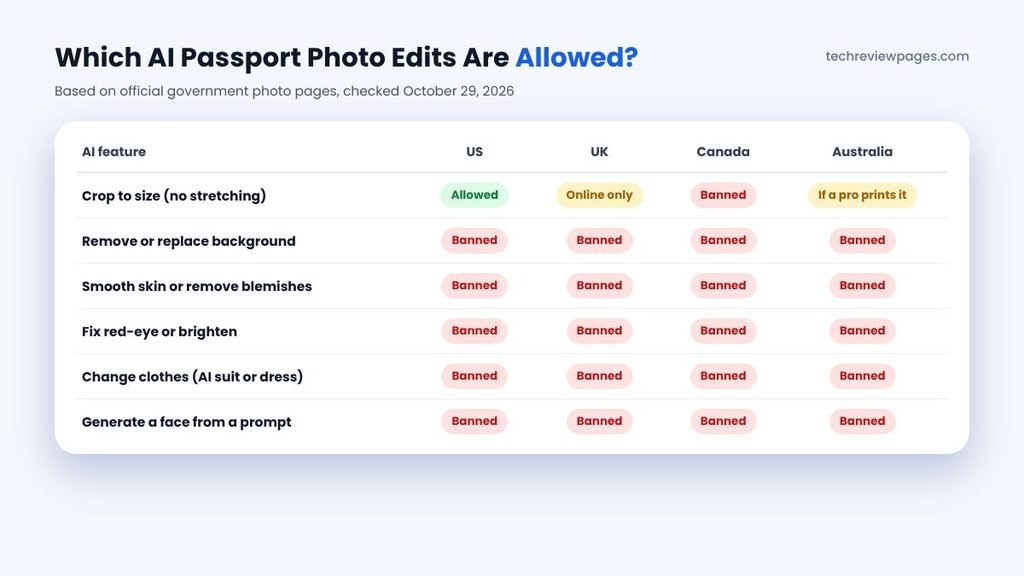
| AI Feature | US | UK | Canada | Australia |
|---|---|---|---|---|
| Crop to size (no stretching) | Allowed | Online only | Banned | Allowed if a pro prints it |
| Remove or replace background | Banned | Banned | Banned | Banned |
| Smooth skin or remove blemishes | Banned | Banned | Banned | Banned |
| Fix red-eye or brighten | Banned | Banned | Banned | Banned |
| Change clothes (AI suit or dress) | Banned | Banned | Banned | Banned |
| Generate a face from a prompt | Banned | Banned | Banned | Banned |
The pattern is simple when you line the rules up side by side. Cropping a real photo is the only AI step most countries accept, although Canada bans even that. Everything else counts as an edit, which means it can get your application rejected.
Passport Photo Requirements and Size by Country
Every country sets its own size, so a photo made for one country may be rejected by another. This passport photo size by country table comes from official government pages, each one checked on October 29, 2026.
| Country | Photo Size | Head or Face Size | Background | How Recent |
|---|---|---|---|---|
| United States | 2 x 2 in (51 x 51 mm) | Head 25 to 35 mm, chin to top | White or off-white | Last 6 months |
| United Kingdom | 35 x 45 mm (printed) | Head 29 to 34 mm | Cream or light grey | Last month |
| Canada | 50 x 70 mm (printed) | Head 31 to 36 mm | Plain white or light | Last 6 months |
| Australia | 35 to 40 mm wide, 45 to 50 mm high | Face 32 to 36 mm, chin to crown | White or light grey | Last 6 months |
| Germany | 35 x 45 mm | Face 32 to 36 mm, chin to hairline | One bright, plain color | Must look like you now |

Visa Photos vs Passport Photos
A visa photo is not always the same as a passport photo. Most Schengen countries ask for 35 x 45 mm, the same size Germany uses, according to the German missions’ photo guide. Still, each consulate or visa center can add its own rules, so check the one you are applying through. US visa photos follow the same 2 x 2 inch rule as passports. Green card photos have their own rules too, so read them before you print.
What Makes a US Passport Photo Acceptable?
The US is the most searched country, so here is a closer look at what the State Department expects from every applicant.
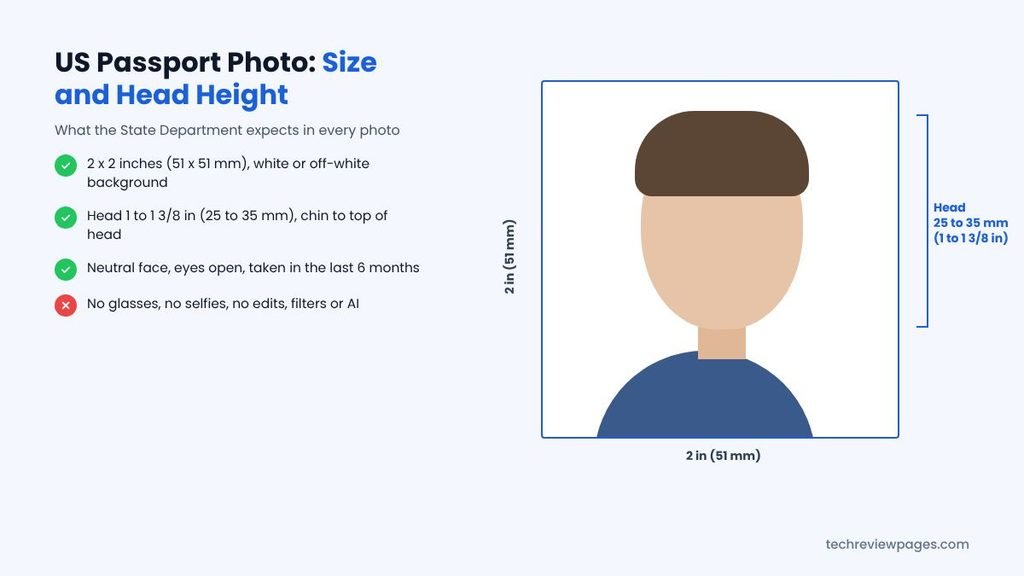
- Size: 2×2 inches (51 x 51 mm).
- Head size: 1 to 1 3/8 inches (25 to 35 mm) from the bottom of the chin to the top of the head.
- Background: white or off-white, with no shadows, texture or lines.
- Face: neutral expression, both eyes open and mouth closed.
- Glasses: take them off, but if you cannot for medical reasons, include a signed note from your doctor.
- Who takes it: a friend or family member may take it, but selfies are not allowed.
- Age: taken within the last 6 months.
- Edits: none, since the State Department also says it checks photos for signs of AI use.
Try the Free Tech Review Pages Passport Photo Sizer
We built a small tool for this guide that handles only the safe part of the job. You upload a real photo, then drag it into place while guide lines show where your chin and the top of your head should sit. Then you download the photo at the right size, ready to print or upload.
- It never edits your photo. There is no background removal, smoothing or color change, because it only frames and sizes your picture.
- Your photo stays on your device. Nothing is uploaded to a server.
- It supports the US, UK, Germany and Australia. Canada is left out on purpose, because Canada bans cropping.
- It makes a 4 x 6 print sheet for the US and Germany. The sheet is turned off for the UK and Australia, since both need professional prints.
Upload a real photo taken against a plain light wall. Then drag it so the top of your head and your chin sit inside the bands.
Top of head band
Chin band
How to Take a Passport Photo at Home (the Safe Way)
You can create a passport photo at home in about ten minutes with a phone and a helper. The safest approach is to get the photo right in the camera, so nothing needs fixing later. Follow these steps, which work for most countries:
- Find a plain, light wall. White or off-white works for the US. Use cream or light grey for UK printed photos.
- Face a window for soft, even light. Avoid harsh shadows on your face or on the wall behind you.
- Ask someone else to take the photo. Have them stand about four feet away, with the camera at your eye level.
- Keep a neutral face. Look straight ahead with both eyes open and your mouth closed.
- Remove glasses and hats. Head coverings are only allowed for religious or medical reasons.
- Take several shots. Pick the sharpest one, with no blur or shadows.
- Use a tool only to size and check it. Turn off any “enhance,” “beautify” or background features.
Tips for Baby and Child Passport Photos
Babies need passport photos too, even though they rarely sit still. Lay your baby on a plain white sheet, then take the photo from above in soft light. Make sure no hands, toys or other people appear in the frame. Rules for very young children can be a little different, so check your country’s official page. Canada, for example, offers video tips for photographing toddlers.
How to Print Passport Photos: 4 x 6 Sheets and Paper Rules
Many tools offer a print sheet, which places several photos on one standard 4 x 6 inch print. You can order that print at a pharmacy photo counter for far less than a full passport photo service. However, this money-saving trick only works in some countries.
| Country | Can You Print a Sheet at Home or a Store? | What the Rules Say |
|---|---|---|
| United States | Yes | Use matte or glossy photo-quality paper. No photocopies, no home scans and no stretching. A 4 x 6 sheet fits six 2 x 2 photos. |
| United Kingdom | No | Printed photos must be professionally printed and cannot be cut down from a larger picture. |
| Canada | No | Photos must come from a commercial photographer, who also stamps the back. |
| Australia | No | Asks for professional prints on glossy paper and advises against apps and booths. |
| Germany | Check first | The photo must be printed in high quality. Check what your passport office or consulate accepts. |
For a US renewal, a home photo printed as a 4 x 6 sheet is often the cheapest legal option. Cut each 2 x 2 photo carefully along its edge, making sure the printer did not shrink or stretch the image.
AI Passport Photo Maker vs Pharmacy vs Photo Booth
An AI tool is not your only choice, so here is how the main ways to get a passport photo compare. Prices vary a lot from one store or region to the next, so call ahead.
| Option | Cost | Pros | Cons |
|---|---|---|---|
| Free AI tool at home | Free, sometimes with paid downloads | Fast, done from home, many sizes | Easy to break edit rules by mistake |
| Paid online service with expert check | Small fee per photo set | A human reviews the photo; some mail prints | You upload your face to a company |
| Pharmacy photo counter, like CVS or Walgreens | Varies by store | Staff know the size rules | You need to travel; quality varies |
| Photo booth | Varies by location | Quick and printed on the spot | Australia warns booth photos often fail |
| Professional photo studio | Usually the highest | Best quality; required in Canada | Costs more; needs an appointment |
For a simple US renewal, a careful home photo plus a sizing tool can work well. For Canada, you will need a commercial photographer anyway. If you only need a digital passport photo for an online form, a tool that resizes without editing is often enough. Services like iVisa or PhotoAiD sit in the middle, adding an expert review for a fee.
How Do AI Passport Photo Makers Work?
When you make a passport photo with AI, most apps follow the same steps behind the scenes. Knowing them helps you spot which of those steps are safe to use.
- Face detection: the AI finds your face, eyes and chin.
- Measurement: it compares your head size and position with your country’s rules.
- Cropping: it trims the image to the right shape, like a 2 x 2 inch square for the US.
- Optional edits: many tools then remove the background, adjust lighting or smooth skin. These are the steps governments reject.
- Export: it saves a digital file or a 4 x 6 print sheet with several photos.
Any AI ID photo tool that stops at step three, or only warns you about problems, is the safest choice for official documents.
Best Free AI Passport Photo Makers in 2026
If you search for a passport photo online free of charge, you will find dozens of tools. We compared the popular ones using what each tool says on its own site in October 2026. We did not rank any passport photo creator on fancy features, because the only thing that matters is how easily it makes a compliant photo. Most of them offer background removal or outfit changes, so turn those features off for any passport.
| Tool | What Its Site Says | Compliance Flag |
|---|---|---|
| Passport Photo Snap | Free, runs in your browser, 140+ countries, print layouts, no watermark | Background removal is offered; skip it |
| NoteGPT | 2 free images a day, then credits; no sign-up; 100+ countries. Google shows 4.9 stars from 38,492 ratings, a figure the site reports itself | Offers background colors and an outfit feature; skip both |
| PassportMaker | Pick your document type, then AI crops your photo automatically | Check that no “enhance” step is applied |
| PFPMaker | Free browser tool, no sign-up, crops to official sizes | Says it “cleans up the background” |
| PhotoAiD | AI crops and resizes, then an ID photo expert checks it | Paid service; background removal included |
| Cutout.Pro | Auto background removal, face centering, many country sizes | Also sells an AI suit changer, which breaks the rules |
| AI Ease | Pick a country and document, such as passport, visa or green card | Check what edits it applies |
| VanceAI | Passport, visa and ID photos for 100+ countries | Check what edits it applies |
| Overchat AI | Turns a selfie into an ID photo in about 30 seconds | Selfies are banned for US passports |
| AI Passport (Visa and ID photos) | iPhone passport photo app for visa and ID sizes | Check its edit settings before you export |
Our pick for US passports: a tool that crops without editing, such as our sizer above. If you want a human check, a paid expert review is worth the small fee. For the UK, Canada and Australia, use a professional photographer for printed photos.
Free AI Passport Photo Maker Without a Watermark
Many “free” tools show a preview at no cost, then add a watermark or ask you to pay for the clean file. Passport Photo Snap says its downloads have no watermark. NoteGPT gives two free images a day before credits. Our sizer never adds a watermark. Always open the final file before you print it, just to be sure.
Passport Photo Maker Online Free: What to Expect
Most online tools work in four steps: pick a country, upload a photo, check the crop, then download. The free part usually covers the digital file. Prints, expert checks or extra countries often cost money. Free tools can also upload your face to their servers, so read the next section on privacy before you choose.
What Reddit Users Say About AI Passport Photo Makers
Reddit threads about AI passport photo makers keep coming back to two clear themes. First, people dislike paying pharmacy prices for a single photo. One r/SideProject developer built FitPass, an in-browser tool for 38 countries, after paying $12 at a pharmacy. Second, many users want tools that do not upload their face anywhere. Both themes point the same way: a simple crop tool that runs on your device. On Quora, the most common question is simply how to make a passport photo online, which the steps in this guide answer.
AI Passport Photo Maker With a Suit or Dress: Should You Use It?
Some tools let you swap a T-shirt for a suit or a formal dress. It looks neat, but it is a clear digital edit. Canada lists clothing changes as a reason to reject a photo, while the US bans AI changes of any kind. Instead, wear the outfit you want when the real photo is taken.
What About Writing an AI Prompt for a Passport Photo?
Some people search for an “AI passport photo maker prompt” to create a photo from text. Please do not do this for any official document. An AI image is not a real photo of you, yet the State Department says your photo must look like you. A fake photo can cause serious trouble with your application.
How to Check Your Passport Photo Before You Submit
Before you print or upload your photo, run through this quick checklist so you catch problems early:
- Measure the head size. Make sure your head fits your country’s range.
- Look for shadows. Check behind your head and under your chin.
- Check focus. Zoom in on your eyes, which should look sharp with no blur.
- Confirm the background color. It should be plain and light, with no objects or patterns.
- Read the tool’s settings. Make sure no “auto-enhance” or background change was applied.
- Compare with the official page. Rules change, so check the government site on the day you apply.
For online renewals, the government’s own upload tool may also flag problems before you submit.
Is It Safe to Upload Your Face to a Passport Photo App?
Your passport photo is sensitive biometric data, so treat it with care. Most web-based passport apps send your picture to a remote server, yet few say clearly when they delete it. Desktop passport photo software usually keeps files on your computer, which is safer.
- Prefer tools that work in your browser without uploading your photo.
- Read the privacy policy before you upload, especially for children’s photos.
- Avoid tools that ask for your passport number or other personal details.
- Delete your photos from any service when you are done, if it allows that.
Thinking about a general editing tool instead? Our guide to the best free AI background remover explains why those tools should not touch an ID photo.
Case Study: The 2026 US Warning on AI-Edited Passport Photos
As AI photo apps spread, passport offices began seeing more edited photos, so in 2026 the US decided to address the problem in public.
On May 13, 2026, the State Department posted a short warning on its official TravelGov account. It said: “Do NOT use AI or digital editing tools on your passport photo. We will not accept photos that are edited or filtered.” News outlets such as Sahara Reporters covered the post that same week.
The official photo page backs this up with detail. It asks for the original, unchanged photo. It says that cropping out a background with a retouching tool is not acceptable. It also says photos are checked for AI use. Put together, the message is simple: the camera must do the work, while the software stays out of it.
Lessons From the Warning
- Many AI features are now a liability. Background swaps and beauty filters can delay your application.
- Get it right in the camera. Good light with a plain wall behind you beats any AI fix.
- Use AI only as a measuring tool. Let it check size and position, not change your face.
- Check the rules every time. Governments update photo rules often, so an AI tool may not keep up.
Conclusion: Use AI as a Helper, Not an Editor
An AI passport photo maker can save you a trip to the store, along with a few dollars. It can measure your head, crop to the right size, then build a print sheet in seconds. Used that way, it is a smart helper for an annoying but necessary job.
But the rules have changed a lot in the past year. The US, UK, Canada and Australia all ban photos that have been edited, filtered or changed by AI. That includes background swaps, skin smoothing, red-eye fixes and AI suits. Canada even bans cropping, while the UK and Australia want professional prints.
So take a real photo against a plain light wall, in soft window light, with a neutral face. Use a crop-only tool, like the free sizer on this page, to frame it. Finally, compare the result with the official government page before you submit. Getting it right the first time is the fastest path to your new passport.
Frequently Asked Questions
Can AI make a passport photo?
AI can help you crop, size and check a real photo. It must not change your face, background or clothes for US, UK, Canadian or Australian passports. An AI-generated photo is never acceptable.
Can I use AI to make my passport photo?
You can use AI to measure and crop a real photo for a US passport. The State Department says not to change your photo with software, apps, filters or AI. Canada bans even cropping.
Is there an AI passport photo maker free of charge?
Yes. Passport Photo Snap, PFPMaker and NoteGPT all offer free use. Our sizer on this page is free too. Turn off any background or enhance features for a passport.
Is there a free AI passport photo maker without a watermark?
Passport Photo Snap says it adds no watermark, while our sizer adds none at all. Always check the final download before you print.
What is the best AI passport photo maker?
The best one is the tool that crops without editing. For US passports, a crop-only tool works well. For the UK, Canada and Australia, a professional photographer is the safer choice for prints.
Can AI make passport size photos from a selfie?
Many tools can crop a selfie to the right size. However, the US does not accept selfies, which often have a bad angle anyway. Ask someone else to take the photo.
What size is a US passport photo?
A US passport photo is 2 x 2 inches (51 x 51 mm). Your head must measure 1 to 1 3/8 inches from chin to top of head.
Can I print passport photos at home?
For a US passport, you can print on matte or glossy photo paper. The UK, Canada and Australia want professional prints, so home prints will not work there.
Do passport photos need a white background?
For the US, use a white or off-white background. UK printed photos need cream or light grey. Australia accepts white or light grey.
Can I wear glasses in a US passport photo?
No. The State Department says to remove all glasses unless you include a signed medical note from your doctor.
Is it okay to use an AI suit or dress changer?
Not for a passport. Changing your clothes is a digital edit, which these countries reject. For a LinkedIn or resume photo, where AI changes are fine, see our guide to the free AI headshot generator tools.
