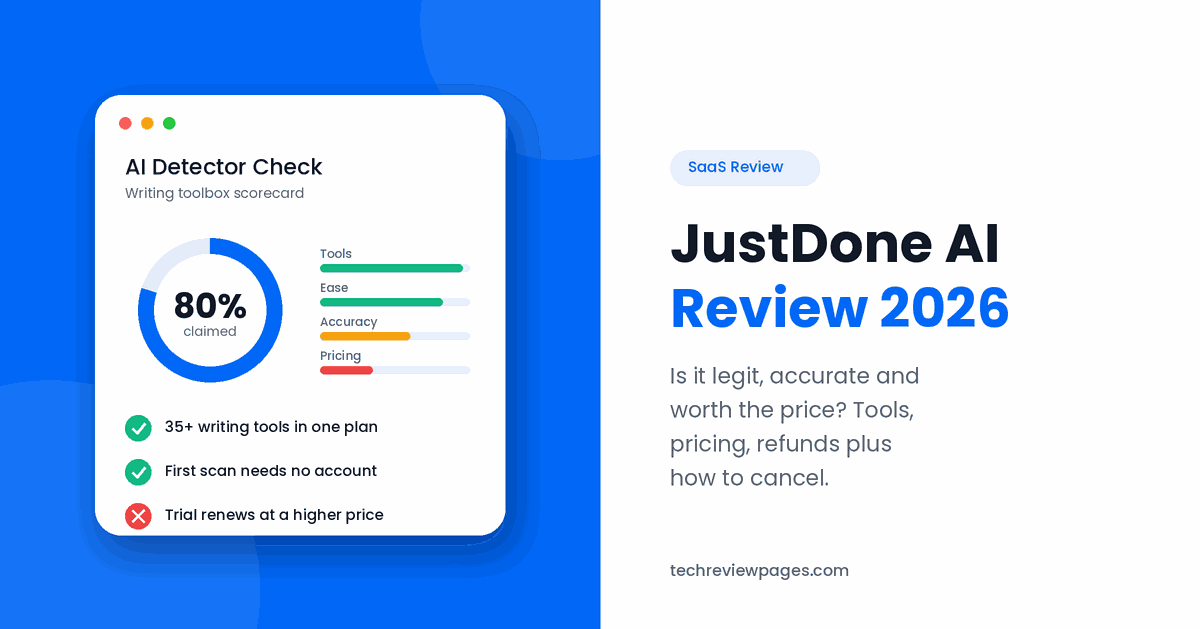
JustDone AI is an online writing toolbox for students, writers, plus professionals. One subscription gives you an AI detector, an AI humanizer, a plagiarism checker, a paraphraser, a summarizer, a grammar checker, plus many more tools.
Many people search for JustDone because they want to know three things. Is the AI detector accurate? Is the company legit? How do you cancel the subscription? This review answers each question in plain words. We are not paid by JustDone, nor linked to it in any way.
Quick Answer: Is JustDone AI Worth It?
What it is: An all-in-one AI writing workspace with 35+ tools
Is it legit? Yes, it is a registered company (GM Appdev Limited, Cyprus) with a large user base, but billing complaints are common
Is the detector accurate? It is useful as a guide, but no AI detector is fully reliable
Is it free? Your first AI detector scan needs no account. Most other features need a paid plan
Biggest warning: Trials renew at a higher price, so cancel at least 24 hours before the trial ends
How We Reviewed JustDone AI
On October 17, 2026, we checked these sources, then wrote down what each one says:
| What we checked | What we looked for |
|---|---|
| JustDone homepage plus tool pages | Features, claims, company details |
| AI detector page | Accuracy claims, word limits, disclaimers |
| Pricing page plus the cancellation notes | Plans, trials, renewals, how to cancel |
| Terms of Use plus Subscription Terms (both last updated July 17, 2023) | Renewals, cancelling, refunds |
| Google’s sponsored results for “justdone ai” | What JustDone promises in its ads |
| Trustpilot profile plus Google’s summary of Reddit threads | Real user praise plus complaints |
| Published research on AI detectors | How accurate detectors are in general |
What we did not do: We did not buy a plan or run our own tests on the detector or humanizer. Everything below comes from JustDone’s own pages, published research, plus user reviews. Where a claim is JustDone’s own, we say so.
JustDone shows different prices to different visitors, so the numbers below may not match what you see. Always read the price on the checkout page before you pay.
What Is JustDone AI?
JustDone AI is an all-in-one AI workspace. Instead of paying for many separate apps, you get a set of writing tools in one place. The company says every plan includes 35+ AI tools. It also offers a Chrome extension, so you can use some tools while you browse.
The company behind JustDone is GM Appdev Limited, with an office in Limassol, Cyprus.
Is JustDone the Same as Turnitin?
No. Turnitin is a separate company that schools use to check student papers. JustDone can show an estimated Turnitin AI score next to its own result. However, JustDone itself says it is not linked to Turnitin, while your school’s result may differ.
Key JustDone AI Tools
| Tool | What it does | Who it helps |
|---|---|---|
| AI Detector | Checks if text was likely written by AI | Teachers, editors, students |
| AI Humanizer | Rewrites text so it reads more naturally | Writers who use AI drafts |
| Plagiarism Checker | Looks for copied text online | Students, bloggers |
| Paraphraser | Rewords a sentence or paragraph | Writers who feel stuck |
| Summarizer | Turns long text or files into short notes | Students, busy readers |
| Grammar Checker | Fixes spelling, grammar, plus punctuation | Anyone who writes |
| Citation Generator | Creates citations for your sources | Students |
| Fact Checker | Helps you check claims in a text | Writers, researchers |
| AI Chat | Chat with the AI, or with a PDF, DOC, TXT file, or website | Researchers |
| AI Research Tool | Helps you find plus sort information | Students, analysts |
| Quiz Generator | Creates quiz questions from a topic or text | Teachers, learners |
| Essay Writer plus Article Generator | Drafts essays, blog posts, or articles from a topic | Bloggers, marketers |
| Business tools | Generators for business plans, SWOT analyses, meeting notes, plus email campaigns | Small business owners |
| Chrome Extension | Brings some tools into your browser | Daily users |
JustDone AI Detector: Is It Accurate?
This is the most searched question about JustDone. Here is what the company says, plus what that means for you.
What JustDone Claims
These claims come from JustDone’s AI detector page, checked on October 17, 2026:
| Claim on the detector page | What it means |
|---|---|
| 80% overall accuracy | Right about 8 times out of 10 across all text types |
| 98% on academic or scientific texts | Its best result, on formal writing |
| 10.3% error rate | About 1 in 10 results may be wrong |
| Up to 15,000 words per scan | You can check a long essay in one go |
| First scan with no account | You can test it before you sign up |
| Checks text from ChatGPT, GPT-4, GPT-5, Claude, Gemini, Llama, plus DeepSeek | It aims to spot writing from the most popular AI chatbots |
JustDone says its results are “independently benchmarked,” but it does not name who ran the test. We could not find any published, independent test with a clear sample size that confirms these numbers. Until one exists, treat them as JustDone’s own claims.
To its credit, JustDone is honest about limits. Its own detector page says, “Every AI detection result is a probability, not a verdict.” It also says short texts, lists, plus heavy formatting are the hardest to judge.
Real-World Case Study: AI Detectors Wrongly Flag Non-Native English Writers
In 2023, researchers at Stanford University tested seven popular AI detectors. They used 91 essays written by real people for the TOEFL English exam, all by non-native English speakers. They published the results in the journal Patterns (read the study).
- The result: The detectors wrongly called 61% of these human essays “AI-generated” on average.
- Worse still: 18 of the 91 essays were flagged as AI by all seven detectors.
- The contrast: The same detectors were almost perfect on essays by US 8th graders.
Why does this happen? Detectors look for simple, predictable word choices. Non-native writers often use simpler words, so their honest writing can look “AI-like” to a machine.
Even OpenAI, the maker of ChatGPT, shut down its own AI text detector on July 20, 2023, “due to its low rate of accuracy.” In OpenAI’s own tests, it caught only 26% of AI-written text, while wrongly flagging human writing 9% of the time (OpenAI’s note).
The lesson: A JustDone score, or any detector score, should never be the only proof. If you are a teacher, talk to the student first. If you are a student, keep your drafts as evidence of your work.
What to Do If a Detector Flags Your Own Writing
- Stay calm: A score is a guess, not proof.
- Show your drafts: Version history in Google Docs or Word shows how your work grew over time.
- Share your notes: Outlines, research links, plus rough notes prove your process.
- Explain your style: If English is not your first language, say so, since detectors often misjudge simpler writing.
- Ask for a fair review: Request that your teacher or editor read the work, not just the score.
JustDone AI Humanizer: What It Does
The JustDone AI Humanizer rewrites AI text so it sounds more natural. The company says it changes sentence rhythm, adjusts tone, then removes common AI patterns.
How it works in practice:
- Paste your text: Add the AI-written draft into the humanizer box.
- Run it: The tool rewrites the text with new sentence lengths plus word choices.
- Read the result: Check that the meaning, facts, plus names stayed the same.
- Edit by hand: Add your own examples, opinions, plus details. This is what truly makes writing yours.
Fair ways to use it:
- Making a stiff AI draft sound more like a real conversation
- Improving the flow of your own writing
- Rewording an email so it sounds friendlier
A word for students: Using a humanizer to hide AI use in schoolwork can break your school’s academic integrity rules, even if a detector does not catch it. JustDone itself publishes an Honor Code plus an Academic Integrity page. Check your school’s rules before you use any AI tool for an assignment.
JustDone AI Pricing (October 2026)
JustDone does not show one fixed price list. Prices change based on the offer, the page, or the visitor. Here are the plans reviewers plus Google’s summary reported in October 2026:
| Plan | First payment | Then renews at |
|---|---|---|
| 7-day trial | About $2 to $7 | A monthly plan, often $29.99 |
| 2-week plan | $9.99 | $19.99 every 2 weeks |
| 4-week plan | $19.99 | $39.99 every month |
| 12-week plan | $29.99 | $59.99 every 3 months |
| Monthly plan | $19.99 | $19.99 every month |
| Yearly plan | $119.88 per year | About $9.99 per month |
These are reported prices, not a quote. The price on your checkout page is the one that counts.
Example: What a “Cheap” Trial Can Really Cost
Say you start a 7-day trial for $2, then forget to cancel. If it renews at $29.99 per month, here is what you pay:
| Time | What you paid in total |
|---|---|
| First week | $2.00 |
| After 1 month | $31.99 |
| After 3 months | $91.97 |
| After 6 months | $181.94 |
Tip: Set a phone reminder 2 days before your trial ends. That gives you time to cancel safely.
Is JustDone AI Free?
Partly. Your first AI detector scan needs no account. Most other tools, plus unlimited scans, need a paid plan. There is no long-term free plan with full features.
How to Cancel Your JustDone AI Subscription
JustDone’s terms say you must cancel at least 24 hours before your trial or billing period ends. If you cancel later, you may be charged for the next period.
Cancel on the Website
- Log in: Go to justdone.com, then sign in with the email you used to sign up.
- Open account settings: Click your profile or account menu.
- Find your subscription: Look for a “Subscription,” “Billing,” or “Plan” section.
- Click cancel: If you are offered a discount to stay, decline it if you still want to cancel.
- Save proof: Take a screenshot of the confirmation, then check your email for a cancellation message.
Cancel by Email
If the button does not work, email JustDone support at support@justdone.ai from your account email. Write “Please cancel my subscription” in the subject line. Keep a copy of the email.
Cancel on Apple or PayPal
- Paid through Apple: Cancel in your iPhone’s Settings, under your Apple account’s Subscriptions.
- Paid through PayPal: Cancel in JustDone first. Then check PayPal’s automatic payments list to make sure nothing is left active.
After you cancel, you keep access until the end of the period you already paid for.
JustDone AI Login & Support
How to Log In to JustDone AI
- Go to the sign-in page: Open app.justdone.ai, then click Sign In.
- Use the same email: Sign in with the email you used to sign up or pay.
- Forgot your password? Use the password reset link on the sign-in page.
- Paid through Apple? Make sure you use the same account you used on your iPhone.
Safety tip: Only log in on the official app.justdone.ai page. Never type your password into a link sent by a stranger.
How to Contact JustDone Support
| What you need | Where to go |
|---|---|
| Cancel, billing, or refund help | Email support@justdone.ai from your account email |
| A problem you posted on Trustpilot | JustDone asks reviewers to email trustpilot@justdone.ai |
| Company address | GM Appdev Limited, Office 202, 2nd Floor, 15 Nafpliou Str., 3025, Limassol, Cyprus |
Tip: Put your account email plus the charge date in every message. This helps support find your account faster.
Can You Get a JustDone AI Refund?
Here is something worth knowing before you pay. JustDone’s ads say one thing, while its terms are much less clear.
| Where | What it says |
|---|---|
| JustDone’s Google ads (October 2026) | “Easy refund system: We stand behind every purchase with friendly and quick customer service” |
| JustDone’s Subscription Terms (last updated July 17, 2023) | Has a section called “Refund rules.” Reviewers who read it report that refunds are not guaranteed |
| JustDone’s Terms of Use | You must cancel “at least 24 hours before the end of the trial” or billing period |
What this means for you: The ads suggest refunds are easy, but the terms do not promise one. Read section 6, “Refund rules,” in the Subscription Terms before you start a trial. If you need a refund, ask quickly, then keep a copy of every email.
How to ask for a refund:
- Email support@justdone.ai from your account email.
- Include key details: The charge date, the amount, plus your cancellation proof.
- Ask clearly: For example, “I forgot to cancel my trial. Please refund my last charge.”
- Know your rights: Under EU consumer law, people in the EU usually have a 14-day right to cancel online purchases, with some exceptions for digital services you have already used.
- Last step: If you get no reply, contact your bank about a billing dispute. Show that you contacted JustDone first.
Is JustDone AI Legit?
Yes, JustDone AI is a real, working product from a registered company with a large user base. However, billing complaints are common, so read the renewal price before you pay. On Trustpilot, it has a 4.3 out of 5 rating from over 9,600 reviews (checked October 2026). About 71% of those reviews give 5 stars, while about 13% give 1 star.
| Users often praise | Users often complain about |
|---|---|
| Easy to use, saves time | Trials that renew at a higher price |
| Many tools in one place | Trouble cancelling on the account page |
| Text that reads more naturally | Unexpected AI scores on their own writing |
| Quick company replies to reviews | Monthly limits on credits |
The company replies to almost all negative reviews on Trustpilot. Most complaints are about billing, not about the tools themselves.
What Reddit Users Say
We could not find many recent Reddit threads about JustDone. However, Google’s own AI summary of Reddit discussions (October 2026) points to the same main theme as Trustpilot: many users find trial renewals plus cancelling hard to manage. Complaints about the tools themselves come up much less often.
Avoid “JustDone AI mod APK” files: Some sites offer “modded” versions that claim to unlock paid features for free. These files can hide malware or steal your data. Use only the official website or the official Chrome extension.
JustDone AI Pros & Cons
| Pros | Cons |
|---|---|
| 35+ writing tools in one subscription | Prices change between visits |
| First detector scan needs no account | Cheap trials renew at a much higher price |
| Checks up to 15,000 words per scan | No independent test confirms the detector claims |
| Honest disclaimers about detector limits | Ads promise easy refunds, but terms do not guarantee them |
| Pay by card, PayPal, or Apple Pay | Some users report trouble cancelling |
| Chrome extension for daily use | Humanizer can be misused for schoolwork |
Our Quick Scorecard
| Area | Our rating | Why |
|---|---|---|
| Number of tools | Excellent | 35+ tools in every plan |
| Ease of use | Very good | Users often praise how simple it feels |
| Detector accuracy | Fair | Useful as a guide, not as proof |
| Pricing clarity | Weak | Prices vary, while trials renew higher |
| Easy to cancel | Fair | Possible, but you must act 24 hours early |
Who Is JustDone AI Best For?
- Content writers: People who want many writing tools in one place.
- Busy professionals: Users who need fast summaries, emails, or reports.
- Editors: People who want a quick first check for AI or plagiarism.
- Students: Learners who use it for grammar, citations, plus summaries, within their school’s rules.
It is not a good fit for: anyone who needs proof that a text was written by AI, or anyone who tends to forget about trial end dates.
How to Choose an AI Writing Toolbox
Want to compare JustDone with other tools? Use this checklist with any app:
| Check this | Good sign | Red flag |
|---|---|---|
| Price shown before checkout | One clear price list | Prices change each visit |
| Renewal price | Shown next to the trial price | Hidden in small print |
| Cancel button | Easy to find in settings | Email-only or hidden |
| Refund policy | Clear money-back window | “All sales final” |
| Detector honesty | Admits errors are possible | Promises “100% accuracy” |
| Free test | Try before you pay | Card needed for any result |
Frequently Asked Questions
What is JustDone AI?
JustDone AI is an all-in-one AI writing workspace. It includes an AI detector, humanizer, plagiarism checker, paraphraser, summarizer, grammar checker, plus more than 35 tools in total.
Does JustDone AI actually work?
Yes, its tools work as described for most users. However, its AI detector, like every detector, can make mistakes. Treat its scores as a guide, not as proof.
Is the JustDone AI detector accurate?
JustDone claims 80% overall accuracy, with 98% on academic texts. We could not find an independent test that confirms these numbers. Research shows AI detectors often flag human writing by mistake, especially from non-native English writers.
Is JustDone a good AI detector?
It is a useful first check, especially since it scans up to 15,000 words at once. For any serious decision, use human review plus drafts, not one detector score.
Is JustDone AI legit?
Yes, it is a registered company, GM Appdev Limited in Cyprus, with a 4.3 out of 5 rating from over 9,600 Trustpilot reviews (October 2026). However, billing complaints are common, mostly about trials that renew at a higher price.
Is JustDone free?
Only partly. Your first AI detector scan needs no account. Most tools need a paid plan or trial.
Is JustDone the same as Turnitin?
No. JustDone is not linked to Turnitin. It can estimate a Turnitin AI score, but your school’s real Turnitin result may differ.
How do I cancel my JustDone AI subscription?
Log in, open account settings, find your subscription, then click cancel. Do this at least 24 hours before your trial or billing period ends. You can also email support@justdone.ai.
Can I get a refund from JustDone AI?
JustDone’s ads promise an “easy refund system,” but its terms do not guarantee refunds. Email support@justdone.ai quickly with your charge details to ask. EU users usually have a 14-day right to cancel online purchases.
How do I log in to JustDone AI?
Go to app.justdone.ai, then sign in with the email you used to sign up. Use the password reset link if you forgot your password.
How do I contact JustDone AI support?
Email support@justdone.ai from your account email. Include the charge date plus amount if your question is about billing.
Is the JustDone AI mod APK safe?
No. Modded APK files are not official. They can contain malware, so use only the official website or Chrome extension.
Conclusion
JustDone AI is a real, working writing toolbox with a lot to offer. For one subscription, you get an AI detector, humanizer, plagiarism checker, paraphraser, summarizer, plus more than 30 other tools. Users often praise how easy it is to use.
However, go in with your eyes open. Its AI detector is a helpful guide, not proof, since research shows that every detector makes mistakes, especially with non-native English writers. Its prices also change between visits, while cheap trials renew at a much higher price.
If you decide to try JustDone, read the renewal price on the checkout page. Set a reminder 2 days before your trial ends. If it is not right for you, cancel at least 24 hours early, then save your confirmation. Used this way, JustDone can be a handy tool without any billing surprises.